What reaches you, and when
Sioul decides in one place when each thing reaches you: mail, calls and other apps' messages by who writes them, Sioul's own notifications by what they are, at each time of your day. Settings ▸ What reaches you says it in sentences first, and lets you change it after. What may come now comes; the rest waits for its time, never lost.
One place
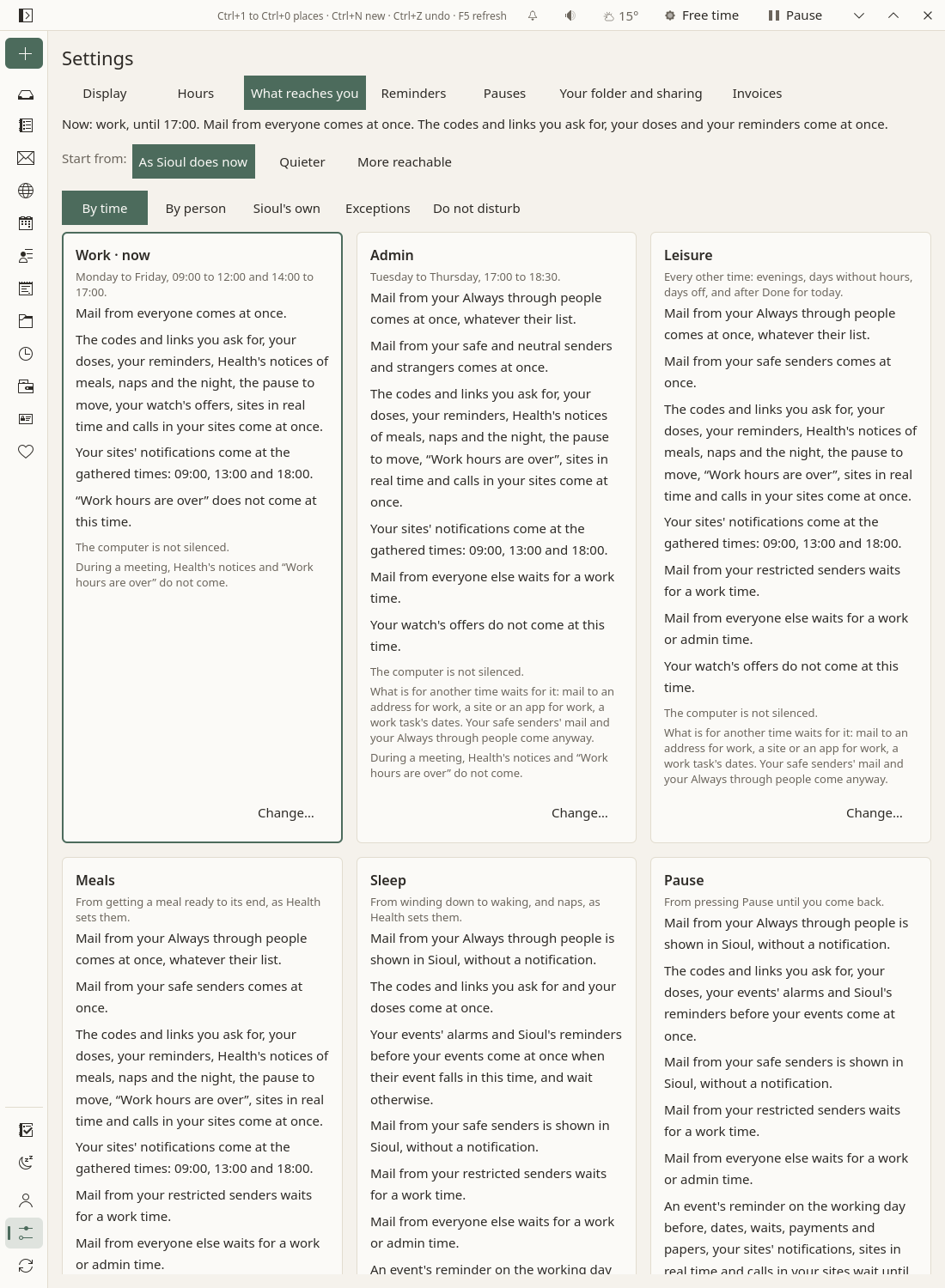
In Settings ▸ What reaches you, always on top:
- Now: what holds at this moment, in a few sentences: "Now: leisure, until 22:00. Mail from your safe senders comes at once. The codes and links you ask for, your doses and your reminders come at once. Mail from everyone else waits."
- Start from: As Sioul does now, Quieter or More reachable (Presets). Once you change a cell, a line says so, "Yours: 3 changes from As Sioul does now.", with Back to As Sioul does now.
Then five views:
- By time (the default): a card per time of your day, in sentences (below).
- By person: what mail, calls and messages do with each list of people, and who is on which list (below).
- Sioul's own: what Sioul tells you itself: codes, doses, reminders, Health's notices, your sites, other apps (below).
- Exceptions: your Always through people, and each conversation, app or site with a choice of its own (below).
- Do not disturb: what turns it on, what holds while it does, what each device does (below).
A press on a mark, or on a row's value, opens its choices in words, the one it has in bold. A greyed one is fixed, for your safety, and says why when pressed. A dot marks what you changed from As Sioul does now. What you set travels with your settings to your other devices (Sharing): one matrix for all of them.
On a phone the whole grid never shows: the cards first, then one time's rows, or one row's times, each value in words.
The times
One time holds at any moment, the first of these that applies (Hours):
- Pause: from pressing Pause until you come back (Pauses).
- Sleep: from winding down to waking, and naps (Health).
- Free time: from pressing Free time until you come back, the night or midnight (Pauses).
- Meals: from getting a meal ready to its end.
- Work, Admin and Leisure, as your hours say. Without any hours set, work and admin together: the more open of their two cells.
Two layers hold on top of the time, never instead of it; of the time and a layer, the stricter wins:
- Time for you: a slot of today's plan kept for you (Tasks).
- Do not disturb, from its switch or a focus session (below). Do-not-disturb held for a pause, Free time or sleep changes nothing: their own columns say it.
Two more switches have a line each under the cards: Let every call through, in the status line on any of your devices (Calls), and Real time, in the Porch's menu (The Porch).
What each mark says
| Mark | In words | What happens |
|---|---|---|
| ● | At once | It comes now: shown, told, let through, it rings. On a layer: the layer changes nothing. |
| ◑ | Shown, not told | It is in Sioul if you look (the Porch); nothing tells you. It is told when a time comes in which it is told. |
| ◐ | When its event falls then | An event's alarms and Sioul's reminder before it: at once when the event falls in this time; else later. |
| ◎ | At the gathered times | It comes at the next gathered time: 09:00, 13:00 and 18:00 unless you set others. |
| ○ | Later | It waits out of sight, and comes when a time it may come in begins: mail off the Porch, a message held, a call sent to voicemail and listed then. |
| – | Not at all | Never told. A code stays on the Porch, mail in its lane, a meal on Health. |
| ★ | At once, whatever their list | Your Always through people. |
| = | As their list | Your Always through people get no more than their own list gives them. |
| ☆ | Through do-not-disturb, at their times | On a layer: it does not hold your Always through people; their own list's times do. |
Where you start from
- As Sioul does now: what this page describes.
- Quieter: your safe senders' mail shown, not told, in leisure and meals; neutral contacts' calls to voicemail in admin time, leisure and meals, and their messages held in leisure and meals; hidden numbers' calls to voicemail in admin time; your safe senders' messages held in Free time; reminders of dates, and sites in real time, wait in leisure and meals.
- More reachable: neutral contacts' mail at once in leisure and meals (their calls and messages come then already); strangers' mail shown in leisure; hidden numbers ring in leisure; other apps' automatons at once in work and admin.
A preset never touches a fixed cell. Choosing one while you have changes of your own asks first: "Quieter replaces your own changes, on every row; the fixed cells stay as they are."
By time
A card per time, the time now first and marked now, then the two layers. Each card says when the time holds ("Monday to Friday, 09:00 to 12:00 and 14:00 to 17:00."), then in sentences, grouped: what comes at once; what comes when its event falls then; at the gathered times; what is shown without a notification; what waits, and until when ("for a work or admin time", "until you wake"); what does not come. Then what the phone or the computer silences then, and what else holds in that time: "After the pause, the Porch rests until your next admin hours." Change… opens the time's rows, each with its value in words.
As Sioul does now, unless you change it:
| Time | Comes at once | Shown, not told | Waits |
|---|---|---|---|
| Work | everyone's mail and messages; calls from your safe, neutral and restricted contacts and hidden numbers; your reminders, doses, codes; Health's notices, the pause to move; a site in real time | strangers' calls go to voicemail; your sites and other apps' automatons come at the gathered times | |
| Admin | mail and messages from everyone but your restricted contacts; calls from your safe and neutral contacts and hidden numbers; reminders, doses, codes, Health's notices; "Work hours are over" | restricted contacts' mail and messages, for work time; restricted contacts' and strangers' calls go to voicemail; your sites and other apps' automatons come at the gathered times | |
| Leisure | your safe senders' mail, calls and messages; reminders, doses, codes, Health's notices | everyone else's mail and messages, for work or admin time; their calls go to voicemail, listed then; what is for work | |
| Meals | as leisure | as leisure | |
| Sleep | doses; codes; an event's alarms and Sioul's reminder before it when the event is in the night; the alarm at waking | your safe senders' mail | messages and calls, but your Always through people's; dates, until you wake; Health's notices do not come |
| Pause | doses; codes; an event's alarms and Sioul's reminder before it; your Always through people's calls and messages | your safe senders' and Always through people's mail | everything else, until you come back; after it, the Porch rests until your next admin hours |
| Free time | your safe senders' calls and messages; doses; codes; an event's own reminders when it falls in it | your safe senders' mail | everyone else, until Free time ends; reminders of dates; sites; Health's notices do not come |
The two layers hold on top of the time, and only ever hold more:
- Time for you: mail is shown at most, untold; your sites and other apps' automatons wait; the pause to move does not come. Calls, messages, reminders, doses and codes follow the time.
- Do not disturb: your Always through people's mail, calls and messages come at once; everyone else's mail is shown at most, untold; their calls go to voicemail and their messages wait; your sites, a call in a site and other apps' automatons wait; the pause to move does not come. Reminders, doses, codes and Health's notices follow the time.
Free time has its own choice, on its card: Nothing at all, not even your safe senders. Your Always through people, doses and the codes you asked for still come. Free time's menu in the status line offers it too (Pauses).
What a thing is for holds too, whatever the cells: mail to an address for work, a site or an app for work, a work task's dates wait for work time, but your safe senders' mail and your Always through people (Hours). During a meeting, no meal's notice and no "Work hours are over". After a pause, the Porch rests until your next admin hours: new mail is shown there, untold. The cards say each where it acts.
By person
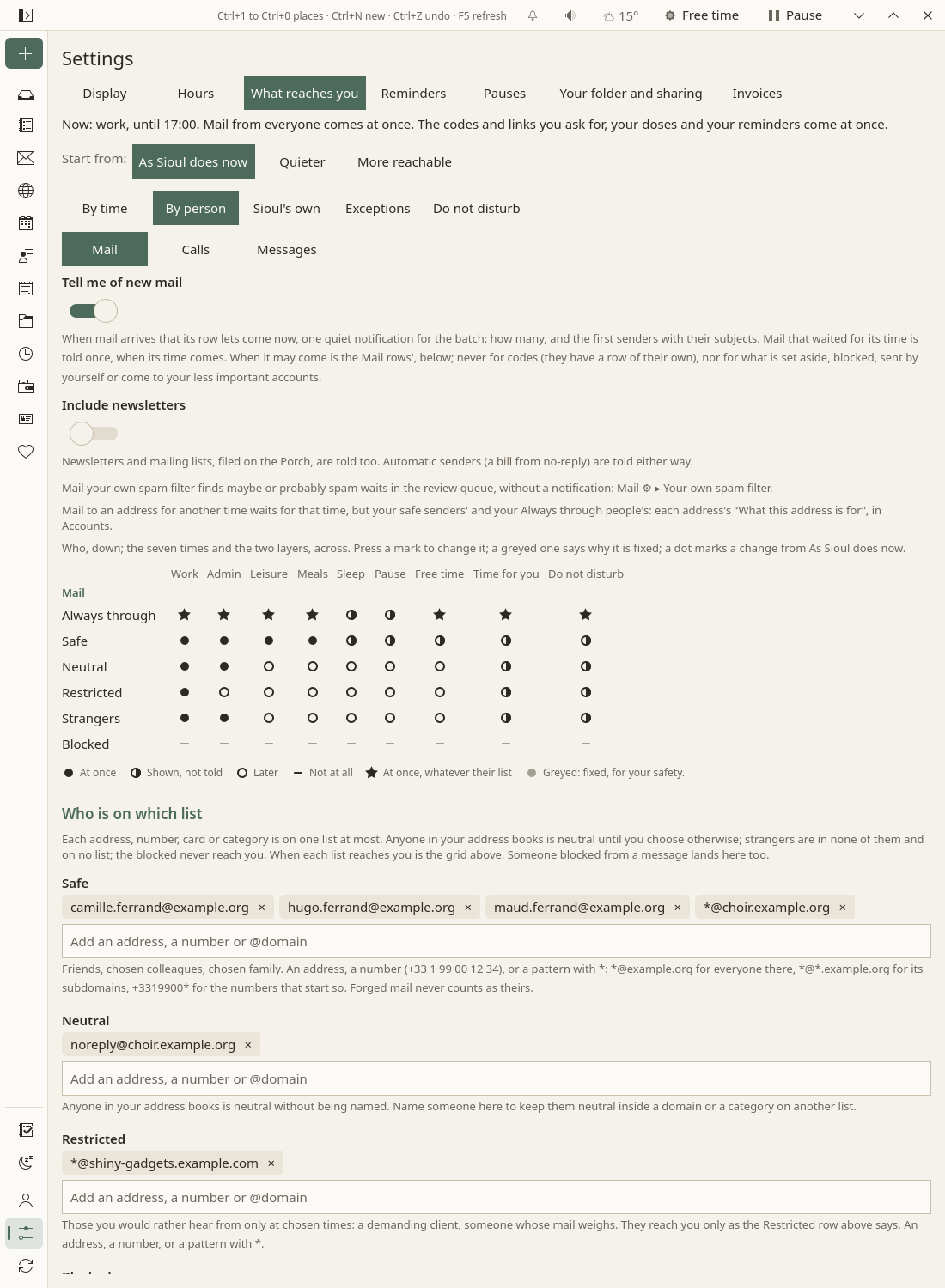
Mail, calls and other apps' messages follow who wrote, whatever the address or the number they use. Mail, Calls and Messages (texts and chats from other apps, on a phone) each have a grid: who down, the times and the layers across. Calls and messages act through a phone of yours: until one screens your calls, or holds other apps' notifications (a phone with this version of Sioul tells your other devices whether you gave Sioul notification access there), a sentence says so above their grid.
Who, a row each:
- Always through: the people on your Always through list (below). ★ at once whatever their own list says; = as their own list.
- Safe: friends, chosen colleagues, chosen family. Only you put someone there.
- Neutral: anyone in your address books, or let in from the screener, until you choose otherwise.
- Restricted: those you would rather hear from only at chosen times: a demanding client, someone whose mail weighs.
- Strangers: in none of your address books, and on no list; and mail nothing proves is theirs.
- Hidden numbers (calls): a call that shows no number, someone who hides theirs or a hospital's switchboard, which is why they ring in work and admin time.
- Groups (messages): a conversation where several people write, as strangers until you change their row.
- Blocked: never, on any channel, even on your Always through list: their mail set aside for good, never shown, never counted; their calls declined and never listed. Nothing is deleted.
As Sioul does now:
| Work | Admin | Leisure | Meals | Sleep | Pause | Free time | Time for you | Do not disturb | |
|---|---|---|---|---|---|---|---|---|---|
| Always through | ★ | ★ | ★ | ★ | ◑ | ◑ | ★ | ★ | ★ |
| Safe | ● | ● | ● | ● | ◑ | ◑ | ◑ | ◑ | ◑ |
| Neutral | ● | ● | ○ | ○ | ○ | ○ | ○ | ◑ | ◑ |
| Restricted | ● | ○ | ○ | ○ | ○ | ○ | ○ | ◑ | ◑ |
| Strangers | ● | ● | ○ | ○ | ○ | ○ | ○ | ◑ | ◑ |
| Calls | Work | Admin | Leisure | Meals | Sleep | Pause | Free time | Time for you | Do not disturb |
|---|---|---|---|---|---|---|---|---|---|
| Always through | ★ | ★ | ★ | ★ | ★ | ★ | ★ | ★ | ★ |
| Safe | ● | ● | ● | ● | ○ | ○ | ● | ● | ○ |
| Neutral | ● | ● | ○ | ○ | ○ | ○ | ○ | ● | ○ |
| Restricted | ● | ○ | ○ | ○ | ○ | ○ | ○ | ● | ○ |
| Strangers | ○ | ○ | ○ | ○ | ○ | ○ | ○ | ● | ○ |
| Hidden numbers | ● | ● | ○ | ○ | ○ | ○ | ○ | ● | ○ |
Messages go as calls, but strangers' and groups' messages come at once in work and admin time. A mail app's notification on a phone follows the Mail grid, and is held where mail would be shown, not told: a phone cannot show what it holds. A call that goes to voicemail is listed on the Porch when its caller may reach you, or in work and admin time for a row that never rings (Calls).
Mail's own switches, above its grid:
- Tell me of new mail: one quiet notification for each batch of mail that comes now, with how many letters and the first senders with their subjects; mail that waited is told once, when its time comes: "The Porch opens: three letters wait for you." On unless you turn it off. With a phone and a computer, the one you used last tells.
- Include newsletters: newsletters and mailing lists, filed on the Porch, are told too. Off unless you turn it on.
- What your own spam filter holds, in a sentence: maybe spam and probably spam from strangers wait on the Porch, in “Caught by your own spam filter”, never told (Settings).
- What an address is for: mail to an address for another time waits for that time, but your safe senders' and your Always through people's; each address's "What this address is for" is on its card in Accounts.
Who is on which list
Under the grid:
- Four lists: Safe, Neutral, Restricted and Blocked. Each line is an address, a phone number (
+33 1 99 00 12 34, written as you like), or a pattern with*:*@example.orgfor everyone there,*@*.example.orgfor its subdomains,+33899*for every number that starts so. Nobody is blocked for sharing a server or a domain with someone else. - People on a list: everyone you placed on a list from their card or their sheet (below), each with As their categories say, Safe, Neutral, Restricted or Blocked. The card decides for all its addresses and numbers, those added later too.
- Your contacts' categories: one row for each category your contacts use (Friends, Family, Clients…), with No list or one of the four. Everyone whose card is in the category takes it, at each of their addresses and numbers. Nothing goes on a list by itself, family and friends included.
From the person to the list: a person's own choice comes first (their address or number, then their card), then the categories on their card, then a domain or the start of a number; then, neutral: anyone in your address books, and anyone you let in from the screener; everyone else is a stranger. So one friend can be neutral while the category Friends is safe. When one level gives two answers (a person in two categories on two lists), blocked wins, then restricted, then neutral, then safe.
Proof comes first: mail that fails its checks is weighed as a stranger's, and forged mail, or mail borrowing a name, is set aside, even when it claims a safe sender's address.
Sioul's own
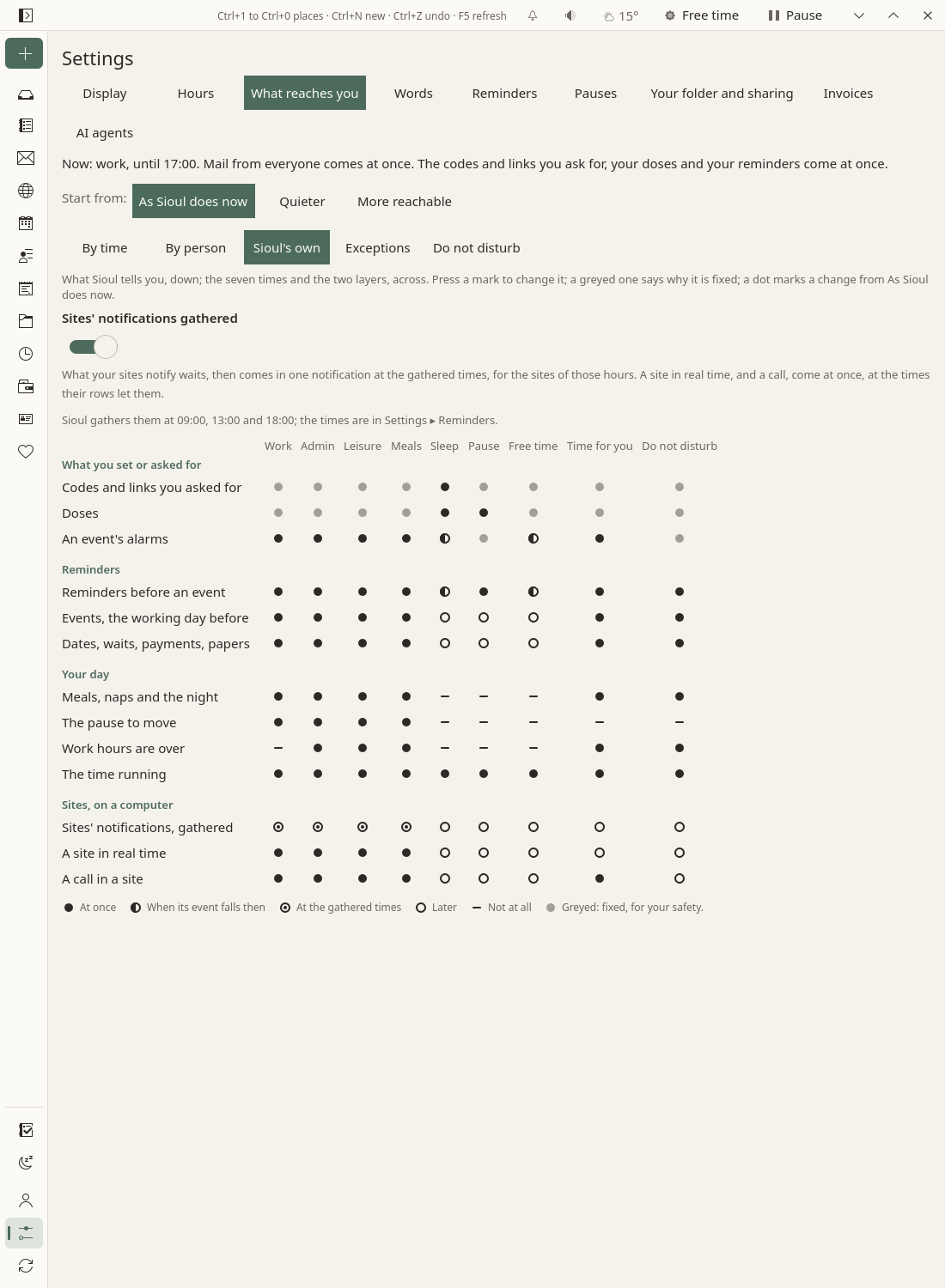
Each notification comes once, never repeated. What each kind does, unless you change its row:
- Codes and links you just asked a site for: at once, at any time, sleep and a pause included, even from a site's automatic address: the code, with Copy the code on Linux, and how long it stays valid. While you sleep, On the Porch only stays a choice: the card then waits on top of the Porch, untold. On a phone, the card alone, on the Porch and on the home screen. A code or an approval in another app is never held either. See The Porch.
- Doses: one notification per dose, within half an hour of its time, with Taken, at any time, sleep included, unless you hold them in sleep or a pause (below). See Health.
- The alarm at waking, on a phone: always (Health).
- An event's alarms, at their time: at once, and in the night or in Free time when the event itself falls then. On a phone they ring, on a channel of their own that passes Sioul's modes.
- Reminders before an event: a quarter of an hour before it and its time to get ready and get there, unless you change it (Agenda); events, the working day before: half an hour before work ends. Each device tells its own.
- Dates asked, waits over, payments, papers and contracts to renew: once each, on a computer, in waking times (Settings).
- Meals, naps and the night: two notices at most for each, each once; none during a meeting, none in sleep, a pause or Free time (Health).
- The pause to move, every 45 minutes unless you change it, in waking times (Health); "Work hours are over", once, at the end of your hours, not in work time itself (Tasks).
- The time running: while a focus session runs, on Linux and on a phone, with Pause and Stop (Time).
- Your sites, on a computer: what they notify waits, then comes in one notification at the gathered times, for the sites of those hours. A site in Real time, and a call in a site, come at once (Sites).
- Other apps, on a phone: their automatons come back at the gathered times; the apps you set to At once come at once in waking times (below).
Fixed, greyed, for your safety; press one to read why:
- Doses: at once, but in sleep and a pause, where you may hold them until you wake or come back. Never "not at all".
- The codes you asked for: at once, but in sleep, where On the Porch only stays a choice. You just asked, and a code lasts minutes.
- An event's alarms: at once during a pause and do-not-disturb, as both promise.
- The alarm at waking: always.
Doses
From winding down to waking, and during a nap, doses come unless you change it: you set their times, and a dose at 05:00 is meant to wake you.
- During sleep and a pause: the Doses row, in Sioul's own: At once (unless you change it) or Later. Later, each dose's reminder comes when you wake or come back, once, and so does the question on doses due while Sioul was closed. Every other cell is fixed at once: Sioul never holds a dose without that choice.
- Without a night set on the Health page, nothing keeps notifications away at night: the Porch asks for it in a card (Hours).
The gathered times
Settings ▸ Reminders ▸ Gathered at: 09:00, 13:00 and 18:00, unless you set others. Three a day helped most in a field trial (Fitz et al. 2019).
- On a computer, one notification then says which of your sites have news, for the sites of those hours, on the computer you are at, with Open the Porch. With Sites' notifications gathered unticked (in Sioul's own), their news waits on the Porch only.
- On a phone, other apps' notifications from automatons come back then.
- A gathered time that falls while their row says later is skipped: what waits comes at the next one.
Exceptions
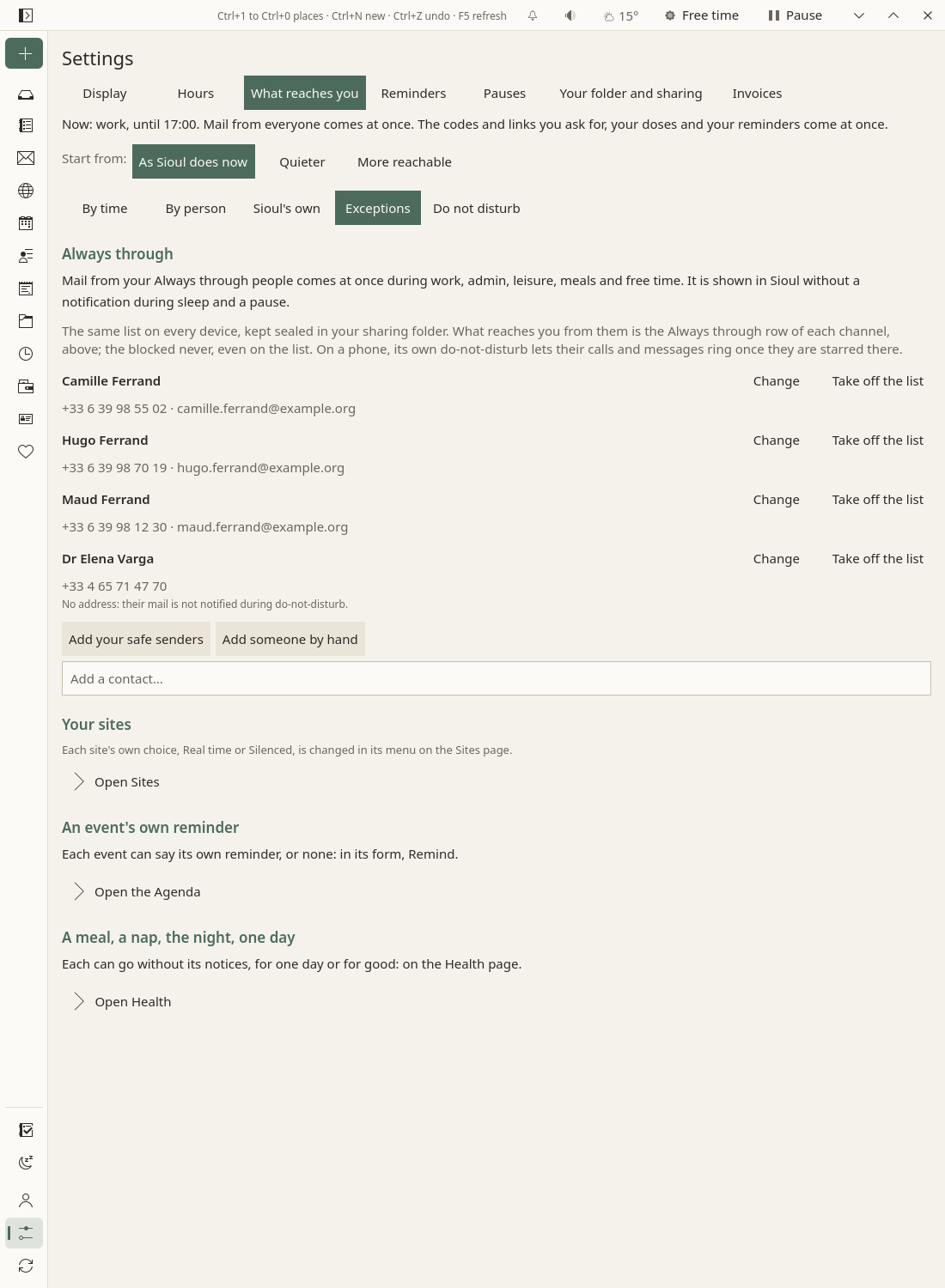
Always through
The people who must always reach you: a carer, your doctor's office, your child's school. One list for all your devices, kept sealed in your sharing folder: your address books may differ from one device to another; the list does not.
Above the list, each channel's Always through row in a sentence. As Sioul does now: their calls ring and their messages come at any time, sleep and pauses included; their mail comes at once, but is shown without a notification while you sleep or pause; do-not-disturb does not hold them. You can make them less: = gives them their own list's times, cell by cell.
- Add your safe senders: everyone on your Safe list, with their card's name and numbers when a card has them. A pattern such as
*@example.orgnames nobody: it is left out, and said so. - Add a contact…: from your address books, by a name, a number or an address.
- Add someone by hand: a name, numbers and addresses, one per line.
- Change, Take off the list.
Someone added again by one of their addresses, numbers or their card stays one person. Under each name, Sioul says what is missing: "No number: their calls and messages cannot ring through."; "No address: their mail is not notified during do-not-disturb." Blocked beats Always through: blocking someone takes them off the list, and putting someone blocked on it takes them off the blocked list; the status line says so. A person's sheet does both in one place (below).
On a phone, its own do-not-disturb names no list: Sioul's modes let through, as far as Android can say it, what the matrix lets through then (What each system does). Under Starred on this phone, in Settings ▸ This phone, Sioul says who on your list is not starred there, with Open their contact, to star it, or Add to contacts.
Other apps' notifications, on a phone
On a phone, Sioul can hold other apps' notifications until their time, as it holds your mail. Settings ▸ This phone sets it up: Android's notification access, holding on or off, and the apps that rang before Sioul held them (This phone).
- Messages between people (texts, chats, mail apps, a missed call) come when the person who wrote may reach you now: their Messages row; Mail's for a mail app, Calls' for a missed call.
- Notifications from automatons (shops, news, social networks, your browser's sites, a text from a short number) come back at the gathered times.
- Always come: calls and alarms; what runs (music, a call in progress, navigation, a download); the reminders and events you set in other apps; codes, and sign-ins or payments to approve; Sioul's own.
- A held notification comes back whole, with its own tap and actions. Sioul never answers, never marks anything as read, never touches read receipts or typing, and deletes none.
- On the Porch, one line says what waits: "Notifications held until 13:00: Discord, Le Monde and two other apps."
In Exceptions, as each app, conversation and site shows up:
- Each app: Notification by notification (the usual: messages by who wrote them, the rest gathered), Messages between people, An automaton: gathered, or At once, as its row in Sioul's own says. An app whose notifications cannot wait (a ride, a delivery at your door, a doctor's or a pharmacy's app): At once. For: work, your admin or leisure, as for an address; any time unless you choose.
- Each conversation: By who writes; Always through, at any time, sleep, pauses and do-not-disturb included (the school's group, say); Gathered with the automatons; or Never, held for good. A group is judged by its own row until you choose. Sioul lets a conversation through, never a name: in chats, anyone can choose their name.
- A conversation Always through, during Sioul's modes: Sioul holds nothing of it, but the phone's own do-not-disturb, which Sioul turns on for a pause, Free time and do-not-disturb, lets a conversation ring only when it is marked Priority in Android (Android 11 and later). Mark it Priority in Android, beside the conversation, opens its page there: choose Priority. A conversation Android has not seen changed yet has no page of its own: the button opens Android's list of conversations, where it shows among the recent ones; or long-press its next notification and choose Priority. Mark as priority only the conversations you let through always: Android rings every priority conversation through Sioul's modes, before Sioul can hold it. On Android 10, which has no priority conversations, it rings only from a starred contact.
- Each site of your browser: Gathered or At once.
Other apps, by time
Other apps, by time, on top of the phone's part of Exceptions, is a table: down, each app seen in the last month, then the conversations you chose for and the ten seen last; across, the seven times and the two layers, as in the grids of By person. Each cell says As usual (=), At once (●), At the gathered times (◎) or Held (○); a press opens its choices in words. To let Discord through during work and hold it otherwise: At once under Work, Held under every other time.
- As usual follows what the notification is: a message by who wrote it, an automaton at the gathered times, an app set to At once at once. Nothing changes for an app until you set one of its cells.
- A conversation's cell, where set, wins over its app's; where it says As usual, the app's counts.
- Under a layer: At once under Do not disturb lets the app through while do-not-disturb holds, at the times its row lets it through; As usual holds it as do-not-disturb holds everyone else's messages.
- As before: your Always through people still come; the blocked never do; codes and approvals, calls, alarms and what runs are never held.
- Each app's line says its row in one sentence: "At once: Work; held: Admin, Leisure, Meals, Sleep, Pause, Free time, Time for you and Do not disturb."
- What Android allows: a notification's first sound plays before Sioul sees it, so make an app you hold at some times silent (Settings ▸ This phone, Make it silent). During a pause, Free time or do-not-disturb, Sioul's own mode decides what rings: what a cell lets through then shows without a sound, unless it is a priority conversation or from a starred contact.
- On a computer, Exceptions shows the apps' rows set on your phone, by name, and changes them: they travel with your settings.
What Sioul keeps, on the phone only, never shared with your other devices: your choices of each app's kind, each conversation's way through and each site's, the names of the apps, conversations and sites it saw, and when what it held comes back. Never what a notification says, unless you send an app's messages to your computers (below). The rows by time travel with your settings: an app's with its name, a conversation's by a number made from it, never its title.
On your computers
Your phone can show your computers the messages its notifications bring, texts first, on their Porch under From your phone: "While you slept, Dr Martin's office wrote: 09:41 Your appointment is moved to Thursday 10:30." It is off until you turn it on, on the phone and on each computer that should show them: Settings ▸ This phone ▸ On your computers on the phone, the part Messages from your phone under Settings ▸ Your folder and sharing on a computer (Sharing).
- Which apps: the phone's SMS app sends its words unless you say otherwise; every other app (Signal, WhatsApp, Discord…) sends nothing until you choose it. For each: Not on your computers, Who and when, or Who, when and the words.
- When they show: once the phone let the notification through, and while the person who wrote may reach you, as on the phone; a text from a service (a short number, "AMELI") at the automatons' times. Never as a notification on the computer, never counted.
- What you can do: Text back and Call back for a text, through your computer's app for such links (KDE Connect hands them to your phone), else Copy the number; Seen takes the line away on every device, with ten seconds to undo. It never touches the phone's notification, and never marks anything as read.
- Never sent: codes and approvals ("A code came from your bank at 09:12. It stays on your phone."), pictures ("a picture"), a blocked sender's messages, a conversation set to Never, notifications an app keeps secret, ongoing ones, Sioul's own.
- Kept a week. The words travel encrypted with your passphrase and sit in Sioul's files on each computer that shows them: choose the apps with that in mind.
Sites, events, Health's days
- Your sites, on a computer: each site's Real time or Silenced, said here and changed in its menu on the Sites page.
- An event's own reminder: Remind, in its form and its details, as usual, not this one, or minutes before (Agenda).
- A meal, a nap, the night, one day: each can go without its notices, for one day or for good, on the Health page.
Do not disturb on every device
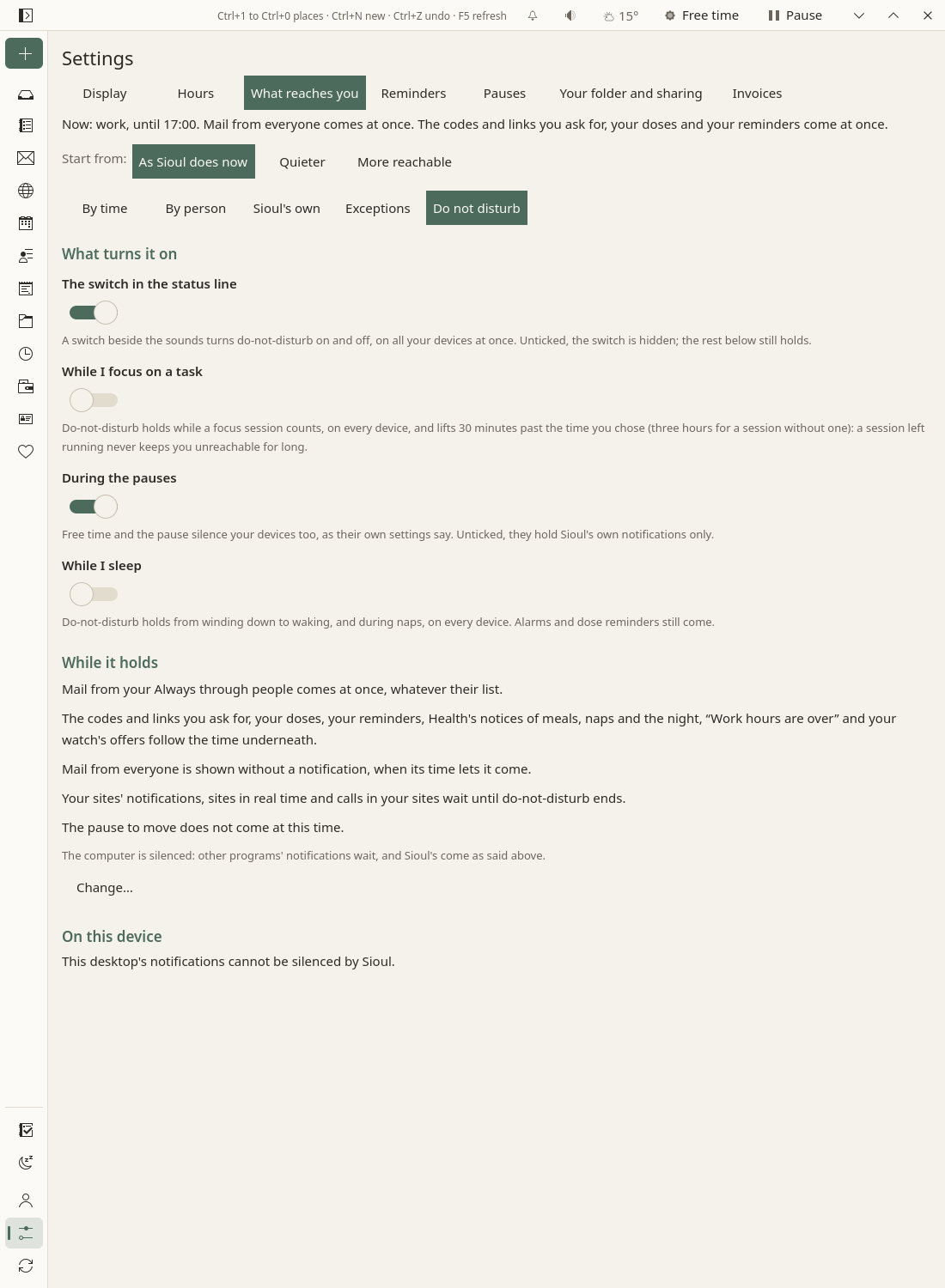
Do-not-disturb is one switch for all your devices: turned on or off on one, it holds on all, as soon as each one hears of it through your sharing folder. While it holds, its column of the matrix applies on top of the time, and each device silences its system as far as the system lets an application do it.
The switch
In the status line, before the sounds. A click turns it on until you turn it off; a click again turns it off, on every device, whatever turned it on. A right click, or a long press, opens its menu:
- why it holds, and a line for each device;
- Turn it off, on every device;
- For 30 minutes, For an hour, For two hours;
- Until 17:00: until the hours you are in end;
- Until I turn it off;
- Do-not-disturb settings…: What reaches you ▸ Do not disturb.
What turns it on
In What reaches you ▸ Do not disturb:
- The switch in the status line (on): unticked, the switch is hidden, unless something holds do-not-disturb on; the rest still holds.
- While I focus on a task (off): while a focus session counts (Tasks), until half an hour past the time you chose, three hours for a session without one: a session left running never keeps you unreachable for long.
- During the pauses (on): Free time and the pause silence your devices too (Pauses). Unticked, they hold Sioul's own notifications only.
- While I sleep (off): from winding down to waking, and during naps (Health).
The latest change wins. Turned off while a focus session counts, it stays off until that session ends, and the next one turns it on again; the same for a night. Turned off during a pause, only your devices' own do-not-disturb is lifted: the pause still holds Sioul's own notifications. Turning it on never holds a reason off. Two devices pressed within a minute, neither knowing of the other: on wins, the quieter choice; one more press settles it.
While it holds, as Sioul does now: your Always through people's mail, calls and messages come at once; everyone else's mail is shown, not told; their calls go to voicemail and their messages wait; reminders, doses, codes and Health's notices still come; your sites, other apps' automatons and the pause to move wait. The view says it in the same sentences as the Do not disturb card, with Change….
What each system does
Each device turns on a do-not-disturb of its own for Sioul's three modes: the pause, Free time, and do-not-disturb from its switch, a focus session or your sleep. It does so as far as its system lets an application do it. Its line says what was silenced and what could not be: in the switch's menu, and in What reaches you ▸ Do not disturb ▸ On this device. Turned off from Sioul, a device's own do-not-disturb goes off too, where Sioul can (Both ways).
-
Android (10 and later): a mode of Sioul's own for each, "Pause", "Free time" and "Do not disturb (Sioul)", among Android's do-not-disturb schedules (its modes, from Android 15). Each lets through what the matrix lets through then, as far as Android can say it:
- Calls: while this phone screens calls (Calls), your contacts' calls ring through the mode, Sioul having sent the others to your voicemail already; anyone's, when the matrix lets strangers through too. Without the screening, your starred contacts' only. Nobody, when the matrix lets no one call then (Free time's Nothing at all, say), but Always through.
- Messages: your starred contacts', when the matrix lets someone write then. Never more: Android plays a message's sound before Sioul can hold it, and the mode is what keeps a held message silent.
- A second call from the same number within 15 minutes, whenever calls get through.
- Conversations marked Priority in Android (Android 11 and later), whenever Always through's messages get through: the conversations you let through always (above).
- Alarms, always. Dose reminders and an event's alarms, each in a channel of its own made to pass the mode ("Doses during a pause", "An event's alarms during a pause"), when the matrix lets them come then; their usual channels never pass, so that your own do-not-disturb holds them as before. New mail from someone Always through, in its own channel too ("New mail from people always let through"), with a sound.
- The rest waits in the notification shade, silent.
Sioul needs Android's "Do Not Disturb access" for this ("Modes access" from Android 15): Open Android's page, in Settings ▸ This phone. The line says what each mode lets through, as Android has it. From Android 15, what you change in a mode in Android's settings wins. Turned off in the quick settings or in Android's settings, a mode of Sioul's turns Sioul's switch off on every device (Both ways). Android 10 has no priority conversations: a conversation Always through rings there from a starred contact only, and the line says so. - Emergency services may call back from a number you do not know (in France, 0 800 112 112): a second call within 15 minutes gets through, and you can star that number, or add it to your contacts while the phone screens calls. - Plasma: Plasma's own do-not-disturb, shown among its notifications as "While Sioul is active", with the mode's name ("While Sioul is active (Pause)"). Sioul's doses, codes, reminders and mail from your Always through people still show, at critical urgency, unless Plasma is set to hide even critical notifications in do-not-disturb: Sioul then says so, and Plasma's notification settings opens the page where Sioul may "Show in do not disturb mode". Other new mail does not show meanwhile: it goes under the bell. Quitting Sioul ends it. Turned on or off in Plasma's notifications, Plasma's do-not-disturb turns Sioul's switch on or off (Both ways). - GNOME keeps its Do Not Disturb for you, under the clock in the top bar. Tick Switch GNOME's Do Not Disturb on with Sioul's, and off after, in What reaches you ▸ Do not disturb, and Sioul does just that; turned off from Sioul, it goes off even when you turned it on yourself. Turned on or off in the top bar, it turns Sioul's switch on or off (Both ways). Sioul's doses, codes and reminders still show; new mail waits in the list under the clock. Not from a Flatpak. - Mac: make two shortcuts in the Shortcuts app, "Sioul pause on", which turns on a Focus (Do Not Disturb, say), and "Sioul pause off", which turns it off. Sioul runs the first as one of its modes starts, and the second as the last one ends. - Windows does not let Sioul do it: its switch is in the notification centre (Windows key + N). - Other desktops (dunst, mako, Xfce…) give applications no way to do it: the line names the notification server.
Both ways
Do-not-disturb is yours, not a device's: each device's own do-not-disturb and Sioul's switch follow each other.
- Turned on or off in a device's own settings, Sioul's switch follows, on every device, whatever did it: Android's quick settings, a schedule, Bedtime, a driving mode or another app; Plasma's notifications, its keyboard shortcut, or a full-screen window and mirrored screens when Plasma is set so (its default); GNOME's top bar. On a phone within seconds, Sioul closed or not; on a computer while Sioul runs.
- Turned off from Sioul, on any device, each device's own do-not-disturb goes off too, where Sioul can: up to Android 14, Android's, and with it every other mode on at that moment (Bedtime, a schedule) until it ends by itself; Plasma's own; GNOME's, once you ticked Switch GNOME's Do Not Disturb on with Sioul's, and off after. From Android 15, Android lets Sioul turn off only its own modes: the switch says "This phone's own do-not-disturb stays on: turn it off in its quick settings.", with Open Android's do-not-disturb settings. On Plasma, what another application or a full-screen window holds back ends with them, and the switch says so.
- A schedule that turns your phone's do-not-disturb on each night and off each morning turns Sioul's switch on and off on every device with it. While only your phone's own do-not-disturb holds it, Sioul adds no mode of its own there: "This phone is silenced by its own do-not-disturb, as set in Android's settings, which turned Sioul's on."; its dose reminders and an event's alarms still come on their channels that pass.
- Sioul's own changes never count as yours: when Sioul turns a device's do-not-disturb on or off, it never takes that for a press.
- When Sioul could not hear it (closed on a computer, a phone still starting), a change is only shown on that device, never sent to the others: "Do not disturb on your other devices; you turned it off here.", with Silence this device again in the switch's menu; or, while Sioul's is off, the "… stays on" line.
- Do not disturb (Sioul), among Android's quick settings: Sioul's switch, pressed without opening Sioul. Add it from the quick settings' editing page.
How fast your other devices follow
- The device you press it on applies it at once, and sends it to the sharing folder at once.
- Your other devices apply it at their next look at the folder, each minute while Sioul is open, once your sync app has brought the change: about a minute with a Nextcloud server. A phone's sync app may take half an hour or more. When the folder lives on a Nextcloud that one of your accounts reaches, Sioul also reads the other devices' files from the server, and a phone follows within about a minute (When the sync app is late).
- With Sioul closed on a phone, Sioul keeps your devices in step in the background, with one quiet notification which says the state now, within a second or two of each change: what now is for and until when ("Leisure until 22:00"), do-not-disturb on or off, and whether your calls are screened. Do-not-disturb turned on at your computer follows within a few minutes: the phone looks every two minutes while another device is in use, every five otherwise, every fifteen while you sleep, and as soon as the sync app writes another device's file. Keep this phone in step in the background, in Settings ▸ This phone: off, changes come when you open Sioul. There too, Allow in the background, or Android may stop Sioul to save the battery.
- Without sharing, it holds on this device only.
What the status line says
While do-not-disturb holds, the switch says where, and until when once every reason that holds has an end (a focus session's limit is never said):
- "Do not disturb, on every device, until 15:00.": every other device heard from in the last week holds it, its system silenced, and this one too.
- "Do not disturb here; your other devices' news is on its way.": the others have not been heard from since it began.
- "Do not disturb, here only.": no other device, or none that can follow.
- "Do not disturb, not on every device.": some follow, some cannot.
- "Do not disturb: this device keeps only Sioul's own notifications back.": this device's system cannot be silenced (Windows, a desktop without a way, a phone without the access). With "on your other devices" when others are silenced.
- "Do not disturb on your other devices; you turned it off here.": you turned this device's own do-not-disturb off while Sioul could not hear it, or turned Sioul's mode off in Android's settings. Silence this device again, in its menu, silences it again.
Off, the switch's tip names the last "off" made in a device's own settings ("Turned off on your phone at 14:02, outside Sioul."), and says what a device's own do-not-disturb still holds there ("This phone's own do-not-disturb stays on: turn it off in its quick settings.").
Its menu says why ("Turned on from your phone.", "While you focus on a task.") and how each device follows: "Here: silenced.", "On your phone: waiting for its news.", "On laptop: Sioul is closed.", "On laptop: an older Sioul, which cannot follow until it is updated." A computer where Sioul quit is closed until Sioul starts there again; one not heard from for half an hour (Sioul stopped without a word) is waiting for its news. A device with an older Sioul does not follow; its own pauses still silence it. On a phone, the card on the home screen shows the line too, while do-not-disturb is on from its switch or a focus session.
A person's sheet
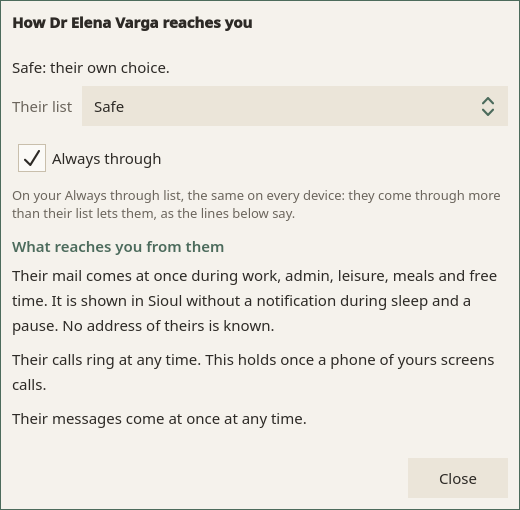
From a contact's card in Contacts, How … reaches you; from a message, in its menu (⋮), How they reach you…:
- Who they are to you, and why: "Safe, as the category Friends says.", "Neutral: in your address book, on no list."
- Their list: As their categories say, Safe, Neutral, Restricted or Blocked, for all their addresses and numbers. An address or a number of theirs with a list of its own is said under it: it comes first.
- Always through: on or off. Blocked and Always through exclude each other: choosing one takes them off the other, and the sheet says so.
- What reaches you from them: a sentence per channel, from their row, at each time: "Their calls ring during work, admin, leisure, meals and free time. They go to voicemail during sleep and a pause. Under do-not-disturb, their calls go to voicemail." What is missing is said too: "No number of theirs is known: their calls cannot be told apart."
A person has a list and Always through; no times of their own. To give one person more, put them on Always through; to give them less, a list.
What never notifies
- Mail in Set aside or Hostile, set aside: forged, borrowing a name, spam, from a sender you blocked, insults.
- What your own spam filter flagged or moved, waiting in Caught by your own spam filter (The Porch), on any device, nor on a phone's home screen.
- Mail to your less important accounts; newsletters and mailing lists, unless Include newsletters; what you send yourself; mail already read elsewhere; the two weeks of mail an address brings when you add it.
- A code's message, as new mail: the code has its own notification.
- On a phone: codes, and the reminders of dates, waits, payments, papers and contracts. They come on a computer.
What comes through anyway
- Doses, unless you chose to hold them while you sleep or pause.
- Alarms, on a phone: the alarm at waking (Health) and your clock's; Android's do-not-disturb lets alarms through. An event's alarms too, in their own channel, while Sioul's modes let them through (a pause and do-not-disturb always do).
- On a phone, the calls that always ring (Calls), and what Sioul never holds of other apps' notifications (above).
- Your Always through people, as their row says, and a conversation you let through always: on a phone, Sioul's modes let it ring once it is marked Priority in Android (above).
Calls
On an Android phone, call screening is apart from do-not-disturb (Calls). Android asks Sioul first: a call from someone whose Calls row says later goes to your voicemail; your Always through people ring as their row says, never when blocked. Android's do-not-disturb comes after: while one of Sioul's modes is on (a pause, Free time, Sioul's own do-not-disturb), your contacts' calls ring through it, the screening having sent the others to voicemail already, and a second call within 15 minutes; without the screening, starred contacts only (What each system does). A do-not-disturb of your own, in Android's settings, lets through what you set there; turning it on or off turns Sioul's on or off too (Both ways).
Where to change each thing
- Settings ▸ What reaches you: the matrix, by time, by person and Sioul's own; Tell me of new mail, Include newsletters, Sites' notifications gathered; Free time's Nothing at all; your lists; Always through and its list; on a phone, each app, conversation and browser site; what turns do-not-disturb on, and what this device's system lets Sioul do.
- Settings ▸ Reminders: Before an event, Events, the working day before, Dates asked: working days before, A wait over, Payments planned: working days before, With Sioul's window closed, Gathered at (Settings).
- Settings ▸ This phone, on a phone: call screening, other apps' notification access and holding, Do Not Disturb's access, who is starred, keeping in step in the background, exact alarms (Settings).
- A person's sheet, from their card or a message: their list, Always through (above).
- An event: Remind, in its form and its details (Agenda).
- A site: Real time, and its menu (Sites).
- Health ⚙: the notices of meals, naps and the night, the pause to move (Health).
- Tasks ⚙: Time for you (Tasks).
- Android's settings, on a phone: each of Sioul's channels, its sound included: "Doses" and "Doses during a pause", "An event's alarms" and "An event's alarms during a pause", "Events" (Sioul's reminders before them), "New mail" and "New mail from people always let through", "Waking", "Focus timer", "Devices in step". A channel "during a pause" passes Sioul's modes while you have not changed it there; the conversations you let through always, Priority in each one's page.