Sites
Some mail never leaves its website: a bank's secure mailbox, the hospital's, the tax office's, the health insurer's. Chats live in the browser too, and so do video calls and dating sites. The Sites page keeps them pinned, logged in once, and turns their notifications into something that waits for you.
Pinning a site
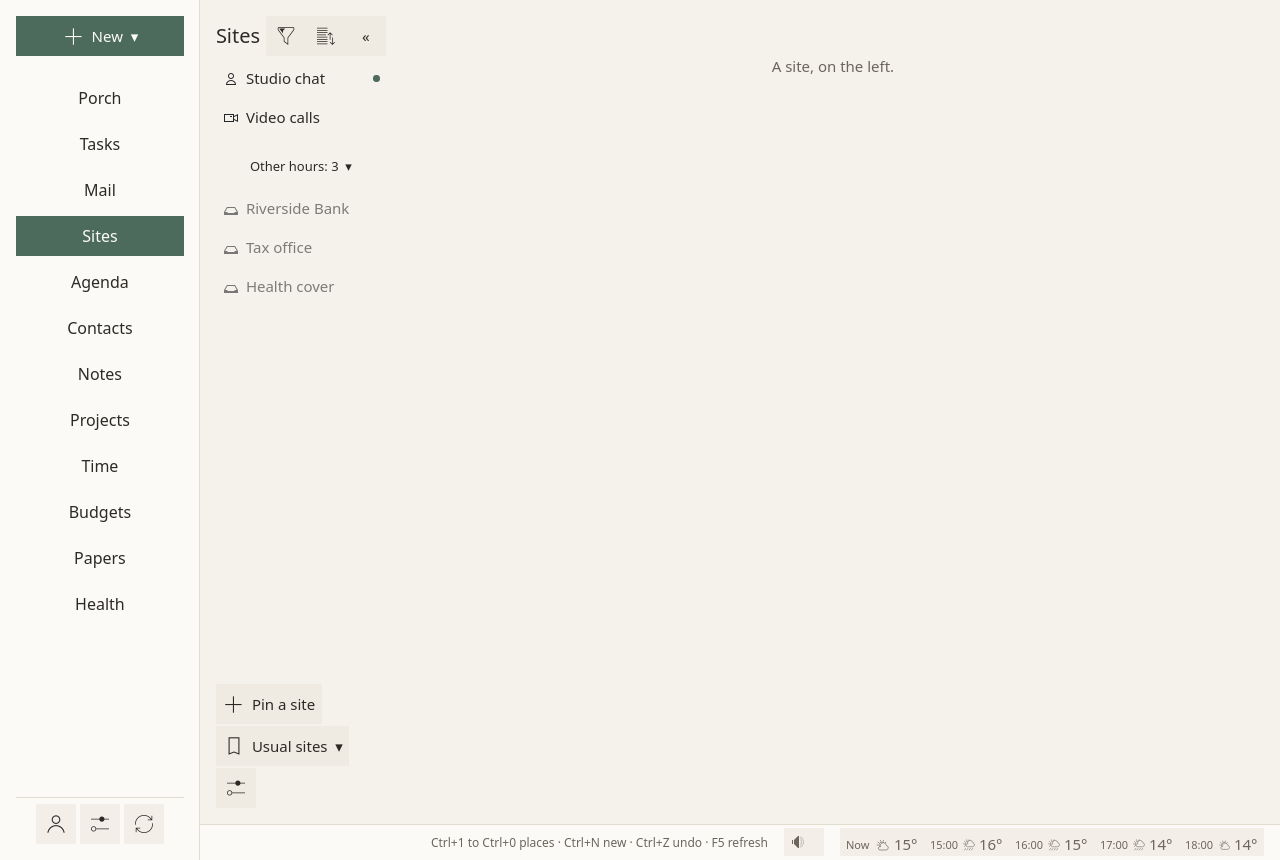
- Usual sites ▾ opens the sites people usually keep, about 400 of them: by country (and by state or province where it matters), then by group: offices, banks, energy, phone and internet; and, for everyone, chats, video calls, social networks, dating. Each group starts with All of them, which pins the whole group at once; a site already pinned is ticked and left as it is.
- Pin a site finds one by a word ("bank", "ameli", "chat"), fills its name, address, type and what it is for in one click, or takes any site by hand: a name and an
https://address.
You log in once, on the site itself. Sioul keeps you logged in; it never stores the site's password itself.
The list
- The sites for these hours come first. The others fold under one line, "Other hours: 3", opened with a click. See Hours.
- Your order: a site's menu ▸ Move up, Move down. The sort button groups them by type instead.
- The funnel filters by what a site is for (work, your admin, leisure), by its type, or by one of your categories; Show every site undoes it.
- Each site's own icon is asked of the site itself, never of an icon service that would learn which sites you keep.
- The list folds to its icons when you want more room for the site.
A site, open
When a site is open, a row above it holds: back, reload, Real time (its notifications at once), Silence its sounds, Fill the login (from Bitwarden, below), and the site's menu, ⋮.
A site's menu
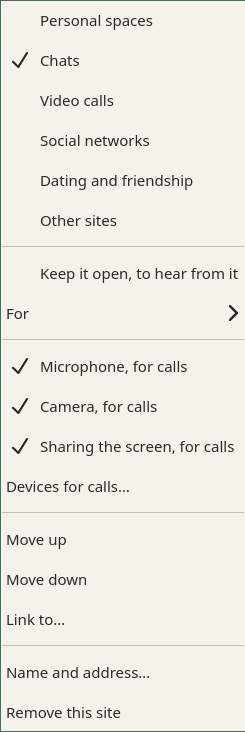
The ⋮ of the site open, or a right click on any site of the list:
- its type: personal spaces (secure mailboxes, client areas), chats, video calls, social networks, dating and friendship, other sites;
- Keep it open, to hear from it: chats are kept open by default;
- For ▸ work, your admin, leisure, or several (unsaid, it follows the site's type);
- Microphone, for calls, Camera, for calls, Sharing the screen, for calls: on for chats, video calls and dating sites, off for the others until you turn them on;
- Devices for calls…: the camera, microphone and speaker that calls use, from your system's list;
- Move up, Move down, Link to… a task, a note, a contact or a project;
- Name and address…: its name, its address, and your own categories ("Bank", "Health");
- Remove this site: it leaves Sioul; nothing changes on the site itself.
Notifications at your pace
Every site's notifications are accepted, then kept by Sioul; the site itself never shows them.
- From the site in front of you: nothing more.
- From a site in Real time (its box, always in view): a desktop notification at once.
- A call ("incoming call") comes at once, unless the site is silenced. A missed call waits like the rest.
- Everything else waits, as "the site has news" on the Porch. Opening the site clears its news.
At set times (09:00, 13:00 and 18:00, unless you choose others in Settings ▸ Reminders and notifications), one notification gathers which sites have news, with Open the Porch. Three a day helped most in a field trial (Fitz et al. 2019).
A site whose hours have not come keeps its notifications, real time and calls included, until they do.
A message from a site's domain ("you have a new message in your secure space") gets a button above it: Open the site.
Calls
Chats, video calls and dating sites have the microphone and the camera. When a call starts, Sioul asks for the devices chosen in Devices for calls…, and plays the call's sound through the speaker chosen. Share in the call lets you choose a whole screen, one window, or nothing. When a site asks for the microphone while it is off, the status line says so, with where to turn it on. The place where you are is never given to any site.
Security keys
When a site asks for a security key (WebAuthn, FIDO2: a YubiKey, for GitHub or Google), Sioul's own dialog says which of the key's accounts, asks for its PIN when it has one, says to touch the key, and says in plain words why it failed (not registered, PIN blocked, time out), with Try again. Passkeys kept on the key work. Passkeys kept in a phone or in the system do not, on Linux and macOS.
Logins from Bitwarden
Sioul fills logins from your Bitwarden vault, read by Sioul itself: nothing else to install.
- In the Sites page's ⚙: your Bitwarden account's e-mail, and its server when it is not bitwarden.com (bitwarden.eu, or your own, Vaultwarden too).
- On a site's login page, Fill the login.
- The first time in a session, open the vault: with your security key (when Bitwarden knows it as a passkey used for encryption), or with your master password, then the second step your account asks for (a security key, an authenticator app's code, a code by e-mail, a recovery code).
The login is written into the page's fields, only on the site it belongs to, only when you ask. When a site has several logins, or none, a list opens, with a search over the whole vault; Choose a login… opens it any time. A login made for another domain says which one, so that a look-alike site shows.
On a page asking for a one-time code, Fill the login writes the code your vault's secret gives now.
Your master password and keys are never kept. The logins stay in memory while the vault is open, until Sioul closes. Nothing is ever written to your vault.
Where it is kept
Each site's address and choices are in Sioul's settings. The sites' cookies and files live in one browser profile of Sioul's own, apart from your usual browser. Their notifications wait in Sioul's state folder until you look.