Projects
A project is any matter you follow: work for a client, whose time is billed, or one of your own, such as housing, health, a tax return or a trip. It gathers what belongs to it: tasks, events, mail, notes, time spent, invoices.
Making a project
New project (or New ▾ ▸ A project):
- Name.
- For a client: its time is billed at an hourly rate. Then: For (who it is for), An hour costs (else the rate in Settings ▸ Invoices), and Invoices expected in: the budget where the money is expected until paid. When For names one of your contacts (their name, or their organisation), the invoices take its postal address.
- Without it, the project is yours. Yours, outside work keeps its tasks in view in quiet time, with family and friends.
- Where it stands: open, waiting, or closed.
Take out of the list removes a project. Its tasks, notes, mail and time stay where they are; they are no longer gathered under it.
A project's page
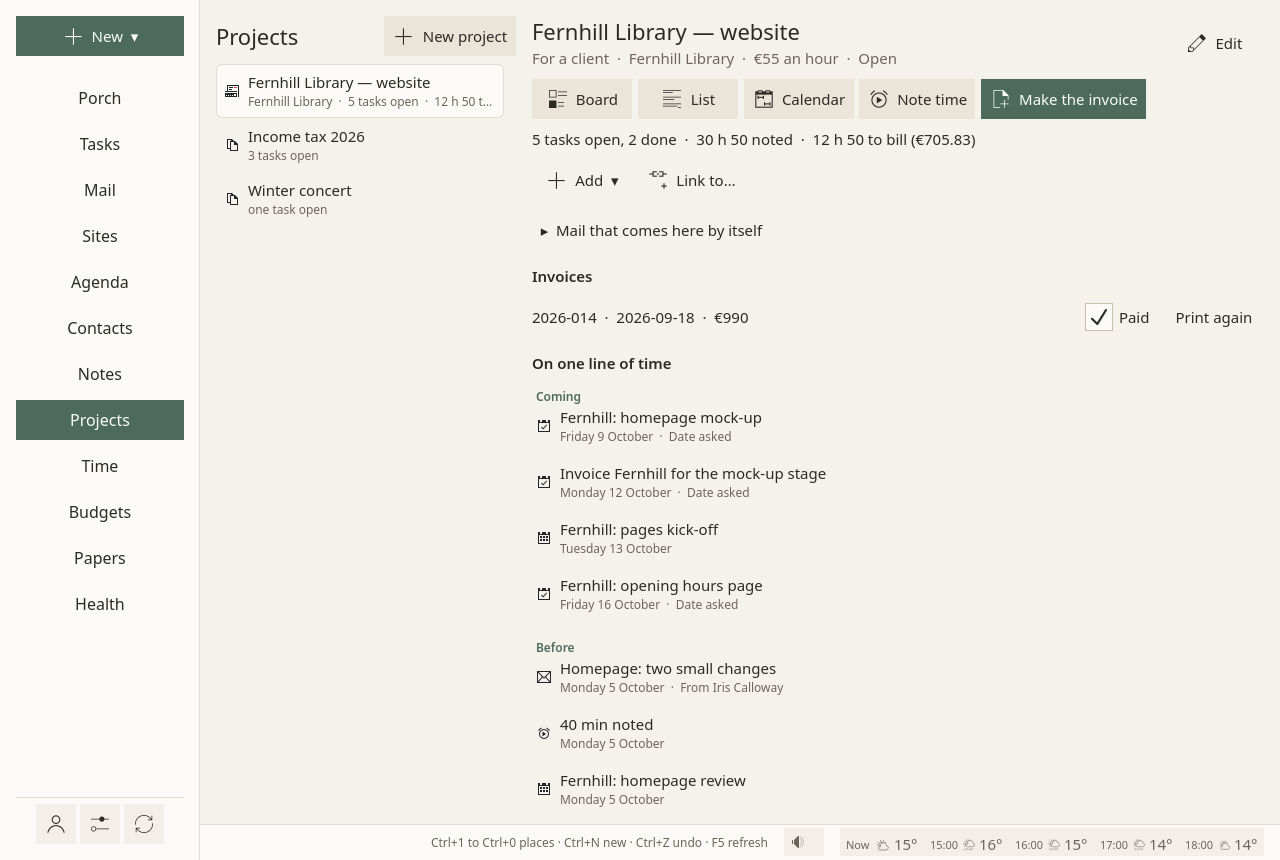
On the left, every project, with its open tasks and the time left to bill. On the right, the project open:
- On one line of time: what is coming first (dates asked of its open tasks, events), then what happened before, newest first: tasks done, mail, notes changed, time noted, invoices.
- Its tasks, as a Board, a List or a Calendar: the Tasks page, kept to this project.
- Note time: a meeting, a call, work done away from the timer.
- Make the invoice, when billable time waits to be billed. See Time and invoices.
- Add ▾ and Link to…, at the end: something new tied to the project, or a tie to something that exists, such as the client's contact.
Mail that comes here by itself
Mail that comes here by itself, on the project's page, gives the project its routes. A message comes to the project when one route matches; every line filled in a route must match:
- From the domains: the sender's domain, or any of its subdomains;
- From the addresses;
- Words in the subject;
- Words in the text;
- Words in an attachment's name ("quote" takes
Quote_2026.pdf).
Several words or domains on one line: any one of them. Words are matched whole, without case or accents.
A reply in a conversation of the project goes with it, and so does a message you tie to it by hand (Link to…). Every routing keeps its reason, shown on request: "sender's domain: example.org".
On the Porch, a project can have its own lane: Projects shown here, in the Porch's ⚙.
Where projects live
In one file, sioul-cases.toml, at the root of your notes folder: readable, and written by hand if you like. A project's tasks and events carry its identifier in a standard field, so other calendar programs keep the grouping.
In quiet time
Projects for clients rest outside working hours: "Work projects rest until work comes back." Show anyway shows them all the same. See Hours.