Contacts and the map
Contacts are names first. Details stay folded until you open them.
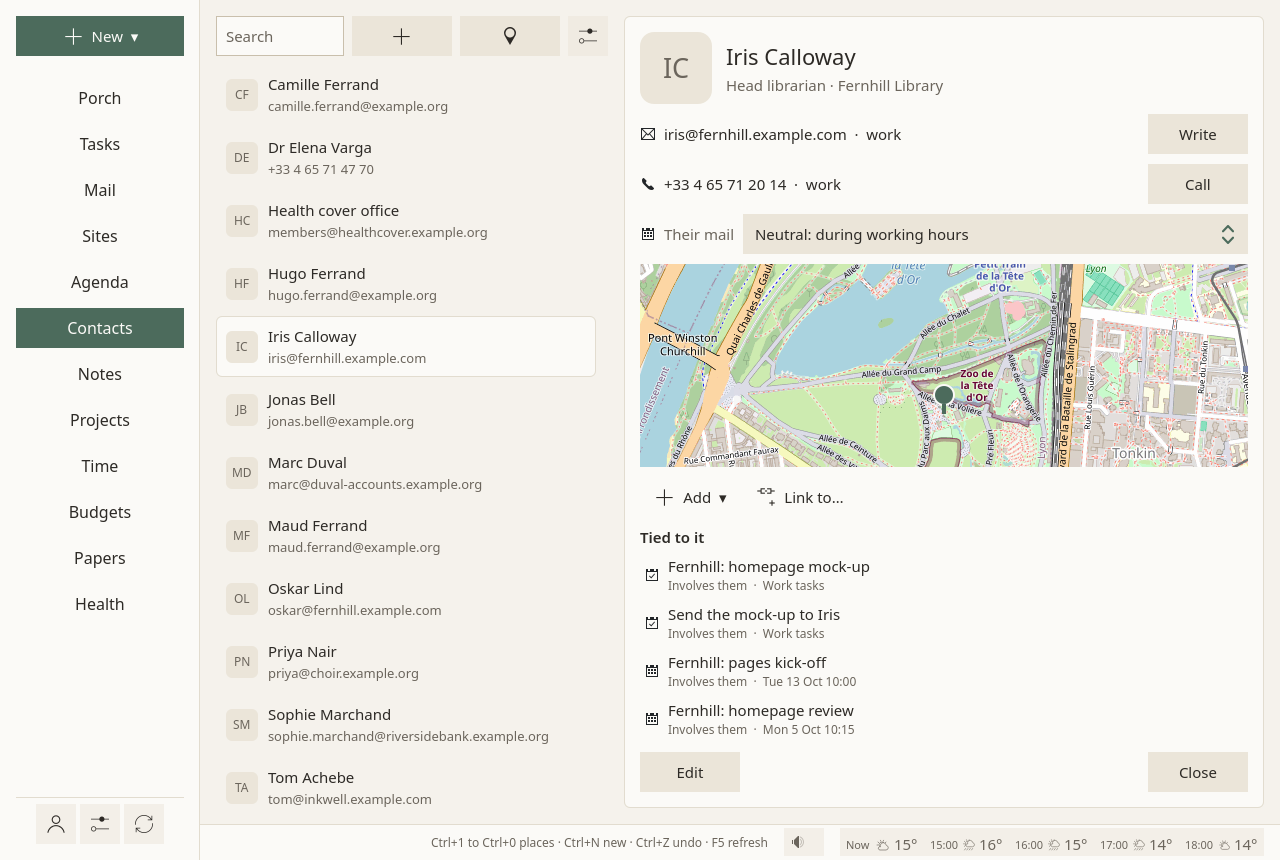
The list
Names, with one line under each, and a search field on top: a few letters of a name, an organisation, an address or a number find them.
A contact
A contact opens on the right:
- its e-mail addresses, each with Write;
- its phone numbers, each with Call;
- folded under More: postal addresses, organisation and role, birthday, notes, web sites;
- Their mail: safe, neutral or blocked, for every address on the card (see the Porch);
- a small map with a pin at their address, once it is placed (below);
- what is tied to it: the mail exchanged, tasks, events, notes, projects.
To change it, Edit, then Save: it is changed in place. To add one, the + above the list, or New ▾ ▸ A contact. From a message, Add to contacts makes the sender a contact in one click.
To delete one, Delete: it waits ten seconds, with Undo.
To move one to another address book, across accounts too, choose it under Address book on its card. When the other place would not keep something (Google keeps less than an open server), Sioul says what, and asks before moving.
When you write a message, addresses are completed from your contacts.
The map
The map button above the list shows everyone with a postal address on one map, a pin each; a pin opens the card.
To be placed, an address has to be turned into a point on the map. Sioul does not do it by itself: the first time, it asks.
Placing your contacts
Place them sends your contacts' postal addresses to OpenStreetMap's geocoder (Nominatim), once each, one a second. Nothing else goes with them. The places found are kept on this computer, and each address is asked only once.
The map images come from OpenStreetMap, fetched sparingly and kept. You can give another source in the settings.
The Contacts settings
The ⚙ at the top of the page:
- Address books: renamed here and on the server at the next sync. An empty address book can be deleted; one holding contacts stays.
- Place contacts on the map: on or off.
- Map tiles: where map images come from, as
https://…/{z}/{x}/{y}.png. Empty: OpenStreetMap's.
Where contacts live
On your contacts server, as standard CardDAV cards: your phone and other programs see them. Editing in Sioul changes only what you changed: a photo or another program's fields come back as they were. When a card was changed both here and on the server between two syncs, the server's version is kept, yours is set aside in a file, and the status line says where.
Google contacts work the same way, with less kept: Sioul writes them as Google reads them, and says what would be lost before moving a contact there.
Not there yet
Groups of contacts, photos, and finding and merging duplicates are planned.