Mail
The Porch is for what is new. The Mail page is for when you choose to look: every address, every folder, all the mail kept. It keeps the Porch's calm: no unread counts, no badges, no red.
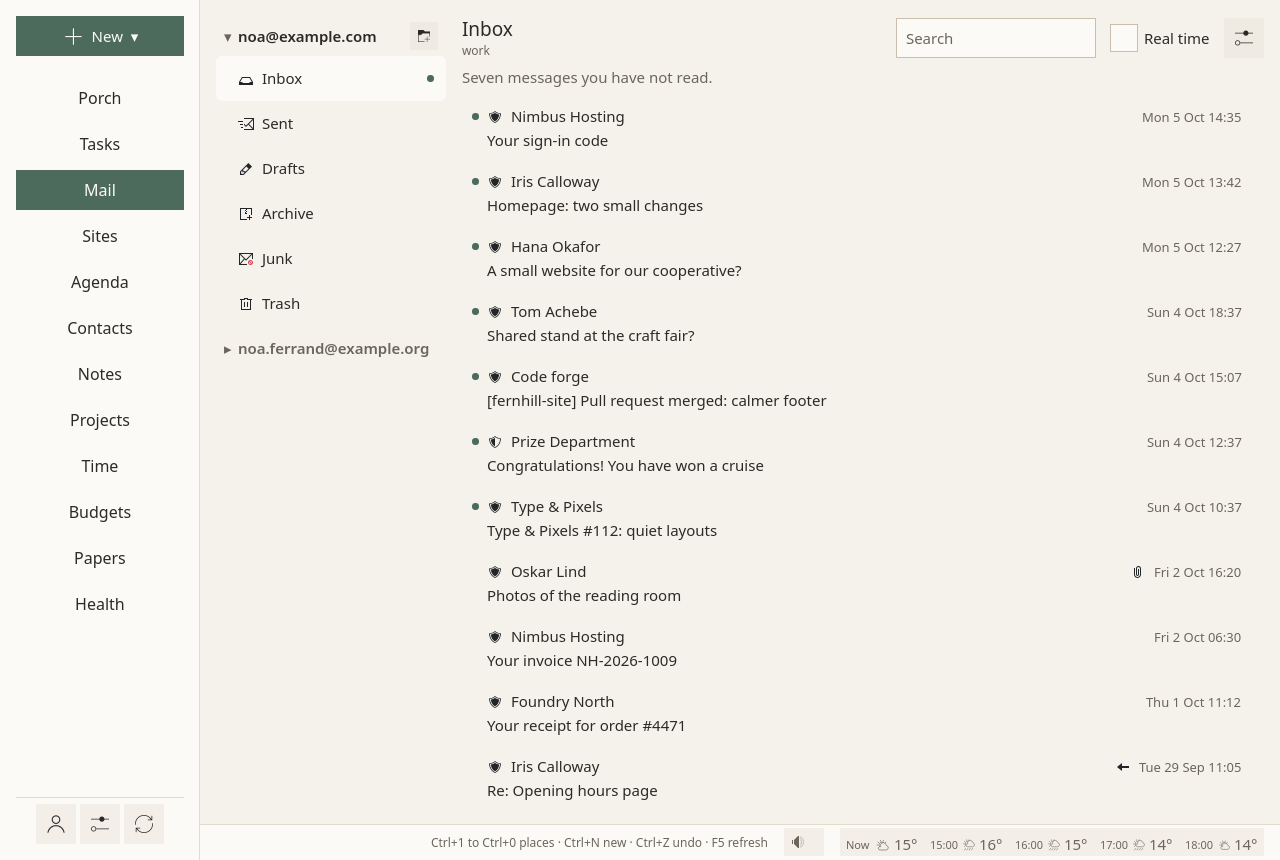
Folders
- On the left, each address with its main folders: Inbox, Sent, Drafts, Archive, Junk, Trash. The others are folded under More folders.
- A small dot marks a folder with something new. How many is said in words when you open it.
- A folder shows its last two weeks. Earlier messages opens the rest, so that no list is endless.
- Search, at the top of a folder: by sender, recipient and subject.
- By conversation, in the Mail page's ⚙: a message and its answers together, under the newest one; your own answers come from Sent.
A right click on a folder offers Keep a copy here or Stop keeping a copy (the server keeps every message either way), New folder…, and Delete this empty folder, for an empty folder of yours.
Reading
A message opens on the right; the folders fold away while you read. Its sender, how far they are verified, its attachments and the earlier messages it quotes are shown as on the Porch.
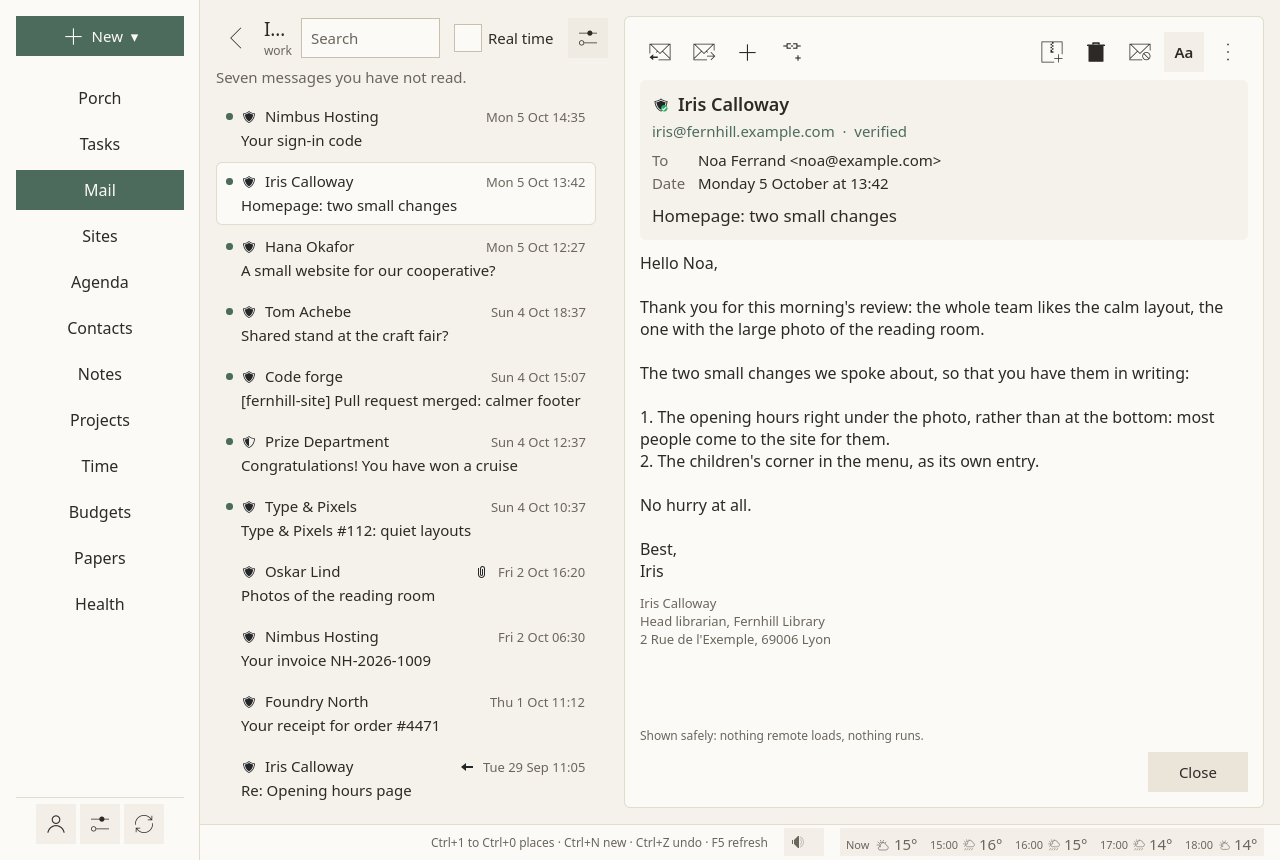
Above the message, always in the same place:
- Reply, Reply to all (only when there are others to answer), Forward;
- Add ▾ (a task, an event, a note, a reply, the sender to your contacts) and Link to… (anything else: a task, a note, a project);
- Archive, Delete, Junk.
Archiving, deleting and junking happen at once, with Undo in the status line for ten seconds; the server is told only after that. There is no "are you sure?". In the trash, Delete for good deletes it for good, with the same ten seconds.
A right click on a message (or its ⋮, or the Menu key) gives the rest: mark as read or unread, flag, Move to…, Show the source, block the sender, Their mail (safe, neutral, blocked), Keep as a contract….
Opening a message marks it read, as any mail program does.
Several at once
- Ctrl + click adds a message to the selection or takes it out; Shift + click takes everything since the last one clicked; Ctrl+A takes all; Esc none.
- A bar then marks them read, archives, deletes or moves them, under one Undo.
- Messages can be dragged onto any folder of any address. Into another address, a message is taken off the first one only once the second server has it.
Invitations
A message that brings an invitation shows it above the text: Accept, Maybe, Decline. The event goes into your calendar and your answer goes to the organiser. A published event has Add to my calendar; a cancelled one, Take it out of my calendar.
Attachments
Each attachment is checked by the antivirus before it opens or is saved. Keep in papers files it in your papers: checked, then kept, and you say what it is.
Writing
Write is always in the same place. You write in Markdown, and line breaks are kept as you type them, as in a chat: a blank line starts a paragraph. Preview shows the message as it will look.
- Cc, Bcc are folded until you need them. When you have several addresses, From chooses which one sends; an answer goes from the address it answers.
- Attach, or drop files on the window. A paper, beside it, attaches one of your papers; one that has ended, or is older than usually asked, says so in the list.
- Your signature is put below the text when the draft starts, after the usual "-- " line, so that you see what goes out. Your name and signature are set per address in Accounts (Name and signature…).
- Answering, the window says "Below your text: Camille's message of …, quoted". The quote is added when the message leaves.
- Drafts are saved as you type, on this computer. Closing the window loses nothing: the draft waits under Drafts, on the left.
Send (or Ctrl+Enter) waits ten seconds, with Undo, before the message leaves. Then a copy goes to Sent. Nothing is ever sent without you.
The message leaves as HTML for those who read HTML, and as plain text, the Markdown itself, for the others.
Signing and encrypting
When you have an OpenPGP key (made or imported in Accounts ▸ Encryption), the writing window has two small switches: Sign and Encrypt. Encrypt works when every recipient's key is known; otherwise it says whose key is missing, and Look for their keys asks their domain's Web Key Directory, then keys.openpgp.org (only when you ask, since it tells a server to whom you write).
An encrypted message is decrypted when you open it; a signature is checked and said under the sender: "Encrypted · Signed by …", or "The signature does not match the text", in warm colours, never red. Your messages carry your public key (Autocrypt), so that people who write back can encrypt.
Settings
The ⚙ at the top of the Mail page:
- By conversation: messages grouped with their answers.
- Fetch every: how often the folders other than the inbox are fetched. The inbox comes as soon as the server says something arrived.
Each address's own settings (what it is for, how far back, how often, its protection) are on its card in Accounts.
Real time, at the top of the page, fetches every folder of every address each minute, for a code or a password you are waiting for.
In quiet time
Outside working hours, work addresses fold, without their dots: "Work mail rests until work comes back. It is all here if you look for it." See Hours.
Not there yet
Emptying the trash or the junk in one go, copying a message to a folder, saving it as a file, drafts kept on the server, sending later. They are planned.