Tasks
A plan written as a list is a wall: every line is there at once, and the next step has to be found again each time. Sioul turns the plan into tasks that wait for each other, and shows the one step to take now, with the reason.
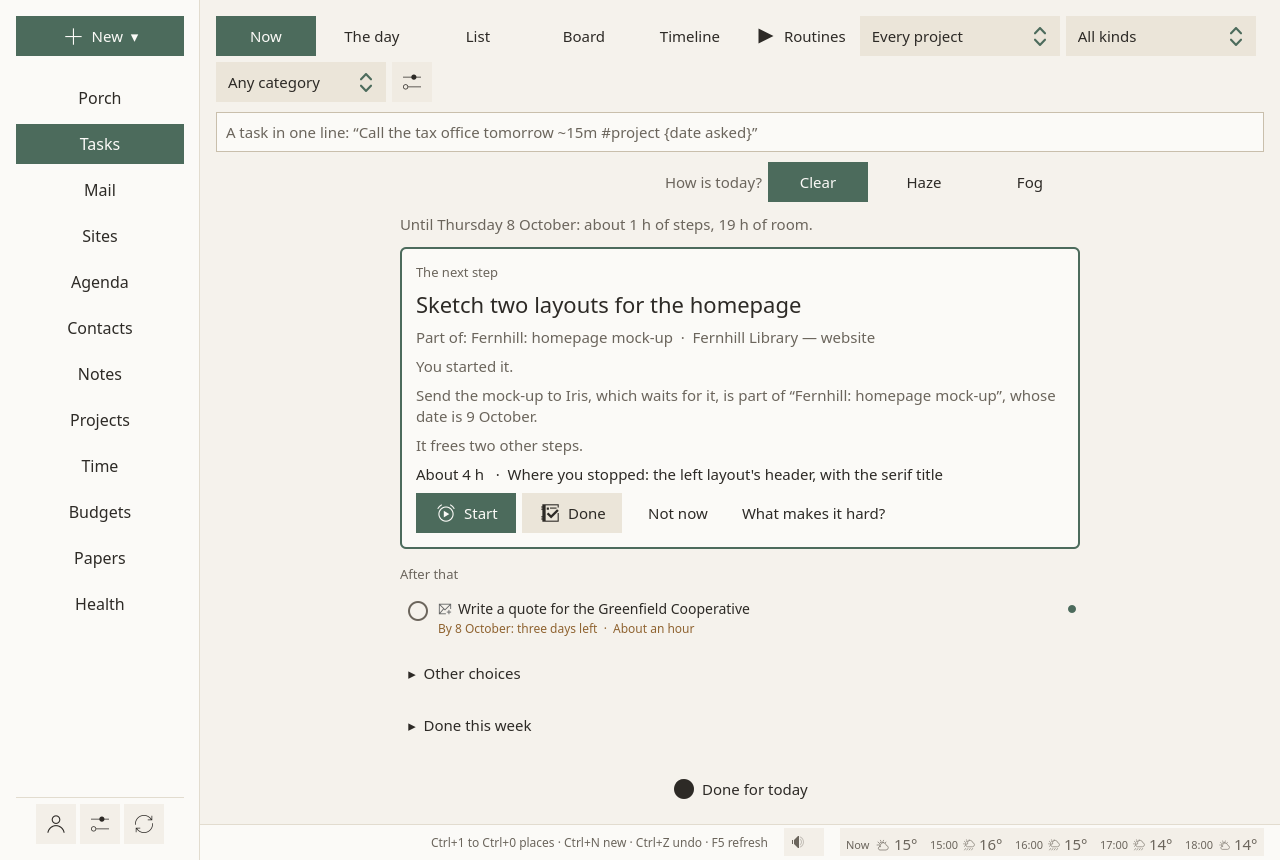
Now
Now shows one step, why it comes now, and the one after it:
- "Its date is 30 October: three weeks left."
- "It frees two other steps."
- "Nothing comes before it."
When several steps are equal, Sioul picks one and says so; it does not hand you a choice to make. Two other choices wait behind Other choices. Folded below: what is started, what you might do if you want, and what got done this week.
Four buttons: Start, Done, Not now, What makes it hard?
Finishing says what it changed, once, in the status line: "Done. This frees: Send the registered letter."
Making a task in one line
The line at the top of the page takes a task in one sentence, from anywhere on the page:
At the end of the line, in English or French:
| Write | For |
|---|---|
| tomorrow, friday, next week, in 3 days, 30/10, 30 October (or demain, vendredi, dans 3 jours…) | the day it can start |
~15m |
how long it takes |
#taxes |
a project or a tag |
{30/10} |
the date asked, from outside: a deadline |
@call, @write, @online, @out, @read, @think, @make |
its kind |
What Sioul understood shows as small labels before you press Enter. A first word that says it plainly also gives the kind: "Call…" is a call. "Ask…" says nothing, since it could be a call or a message.
Tasks live in a task list, on your calendar server or on this computer only. The first time, Make the list makes one in a click.
Nothing is overdue
- A day to start that has passed says nothing: the task is simply free.
- A date asked from outside is said as time left: "By 30 October: three weeks left". Once passed, "Date asked: 1 October". Never in red, never counted.
- The plan always starts from today. A new day starts clean.
Not now is honoured without argument. It puts the step off until tomorrow, with the steps tied to it (those that wait for it, or that are part of the same task), so that the next step comes from something else.
How is today?
At the top of the page: Clear, Haze or Fog. Only you know; nothing is guessed from what you do.
- Haze keeps less for today.
- Fog shows only small steps. One step is a full day.
A task can also say what it takes, in its panel: light, the usual, heavy, or it gives back (a walk, music). A clear day takes two heavy tasks, a hazy day one, a foggy day none. What gives back takes no room in the plan and is never pushed: after a heavy step, it is offered.
Starting, and stopping
Starting is the hard part, so it is helped. Start offers Just two minutes first, then 15, 25 or 45 minutes, or Without an end.
The focus window stays on top while you work elsewhere. A disc drains, in a neutral colour, without ticking and without sound.
- Two minutes before the end: "Two minutes left: time to find a stopping point."
- At the end: Keep going, or Stop here, it counts.
- Stopping offers one line, Next time, start by…, shown when the task comes back.
The time is noted for the task, and for its project (Time). Every 45 minutes, unless you change it in Health, a session pauses for a few minutes of moving; one click starts it again.
What makes it hard?
Five answers: I do not know how to start, It is too big, I dread it, It is boring, No energy today. Each brings one help: the task's notes and messages opened, a step added, two minutes to start, or a lighter day.
The day
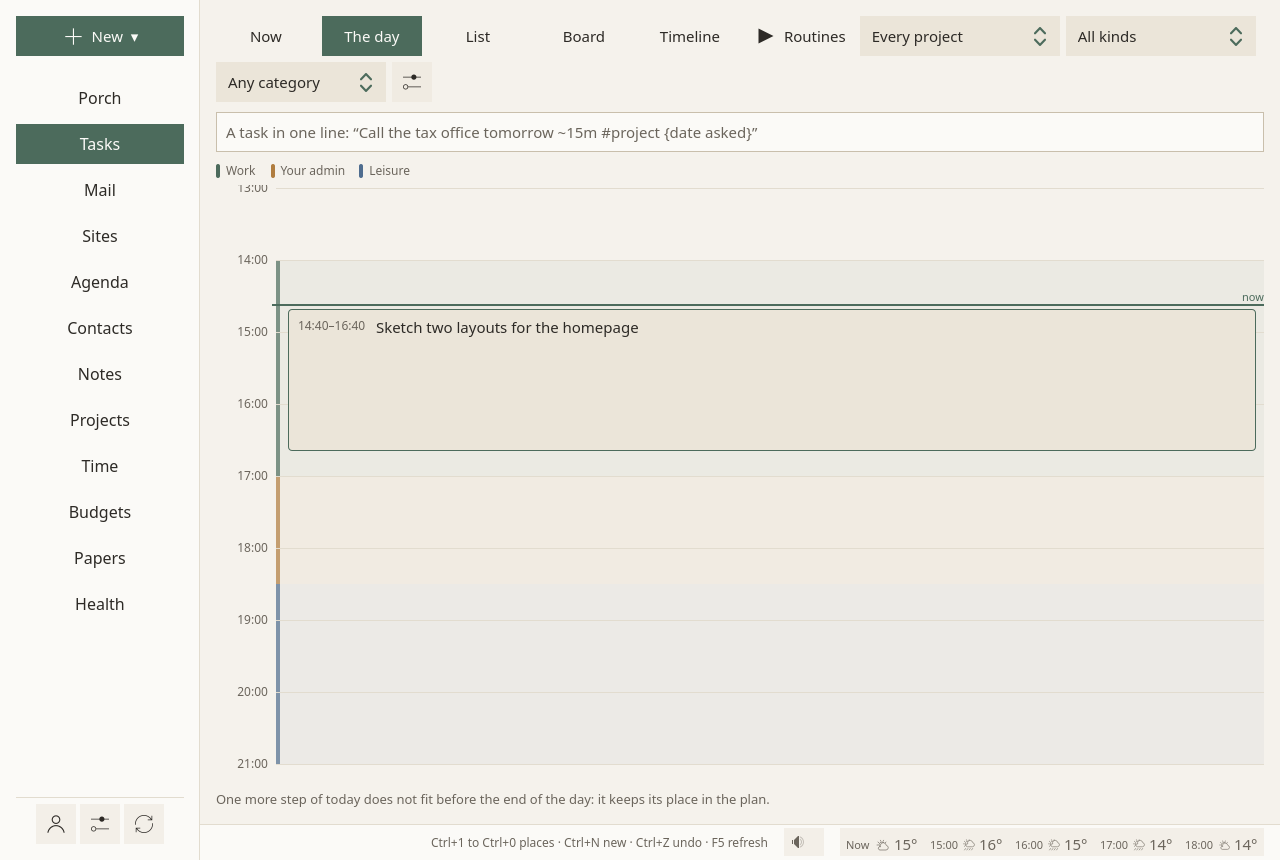
The day lays out today: your hours by what they are for (work, your admin, leisure), the events at their times, and the steps the plan gives today in the hours meant for them, from now on, with a pause between them. A line shows where now is; the step under way is marked, the next one outlined.
It is a layout to look at, never a schedule: nothing is written into the tasks. What does not fit before the day ends keeps its place in the plan, said in one line.
List, Board, Timeline
One switch away from Now:
- List: every open task in the plan's order, a bigger task followed by its steps, grouped By project or By list, with a search, and Done too on request. The optional ones come last.
- Board: Free to start, Started, Waiting, Done (the last two weeks). Cards move by dragging. "Waiting" is decided by what each task waits for, and each card says what. Past three started tasks, one line asks: "Finish or park one?"
- Timeline: each open task on its days, the date asked as a small diamond, days without room shaded. One project, or all.
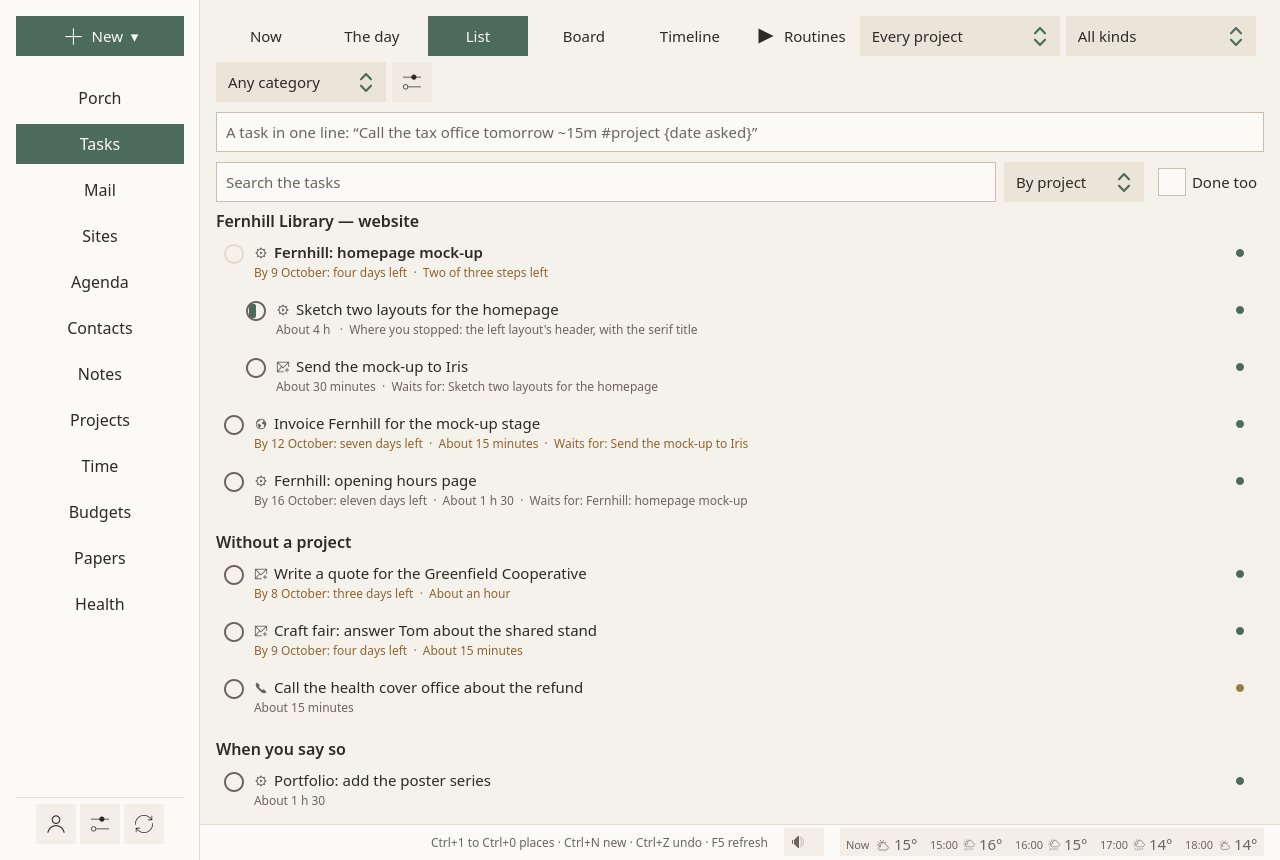
Three choices at the top of the page, Every project, All kinds and Any category, show only the tasks of one project, one kind or one category, in every view, Now included: "the next call". The plan stays whole: a call that waits for a message still waits. Sioul remembers your choices.
A task, open
A task opens on the right, with Start, Done and Not now, then:
- its steps, and one more in a line ("A step, in one line"); the steps' minutes are added up;
- what it waits for ("Waits for…": another task, found by its title), and what it frees;
- folded: Can start from, Date asked, Takes about, Project, Tags, Comes back (repeating), What it takes, For (work, your admin, leisure: see Hours), Billed (Time), Needs an open office, List, and Notes, in Markdown. Another List moves the task there; when that list would not keep everything (Google Tasks keeps less), Sioul says what, and asks first;
- Tied to it: the mail it came from, its notes, the people, the drafts, the project. Write an email starts a message to the people it involves; Make a note starts a note tied to it; Link to… ties anything else.
Anything can become a task: a message, a line of a note, an event to prepare.
Offices have hours
A task marked Needs an open office is proposed only while offices are open (Monday to Friday, 9:00 to 17:00, unless you change it in the Tasks ⚙) and planned only on those days. On a Saturday, the next step is one you can do. A task can also take its own office's hours, with a lunch break.
If you want, and when you say so
A task tagged joy is offered under If you want, never proposed as the next step. One tagged someday waits at the end of the list. Neither takes room in the plan.
The plan
- The order: a task never comes before what it waits for. Tasks that wait for each other in a loop are said, calmly: "These wait for each other: … One of them has to go first."
- The next step, among the tasks free to start: the one you started; then the one whose date comes soonest, counting the work behind it; then your own order; then the one that frees the most others; then the smaller one.
- The days: each task goes into the first days with room. The room is your hours, each kind for its own tasks: working hours for work, hours for your admin for your admin, free time for leisure (Hours). Events are taken out of it, with five minutes before and after each, and each step leaves five minutes after it. A step of up to an hour is never cut; a longer one is cut into parts of a quarter of an hour at least. Without any hours set, the room is Monday to Friday, 9:00 to 17:00. Today's room starts now, and haze or fog make it smaller. Days off, and today once closed, have none.
- Your dates stay yours. The days the plan gives are worked out again each time, and never written into your tasks. Only what you set is kept: a day to start, a date asked, an order.
- When a date will not hold, the task says so once: "At this pace, the plan ends after 30 October. Doing it sooner, making it smaller or handing it over would keep the date." Near a date asked, Now says how much fits: "Until Wednesday 7 October: about 30 min of steps, 3 h of room."
A reminder comes, once, two working days before a date asked, and when a wait is over (Settings).
Done for today
Done for today closes the day, early or not. One click, no question; "Undo" waits in the status line.
A short screen, read in ten seconds, says:
- when work comes back;
- what got done or worked on, if anything was;
- that everything else has its place;
- the first step when work comes back, which you can say your own way ("After breakfast, open the form");
- a date asked before then, if there is one, with Ask for more time, or leave it;
- and what still gets through: one-time codes, and the people you marked safe.
There is no count of what was not done. The next working day opens on that first step. Until then, work rests (quiet time). A thought that comes in the evening can be noted in one line; it waits, out of sight, for work to come back.
Routines
Routines, at the top of the page: steps played one at a time, the next one said before it comes. You write one step a line, with its minutes: "10 min Open the Porch", "Make tea 5".
A routine plays in a small window on top: the step, its time draining in a neutral colour, "Then: …", and the routine as dots. Done, Open (what the step opens), +5 min, Skip, Pause, Stop. None of it is counted.
When a step's time is up, the next one starts by itself only if the routine says so. Otherwise it waits, and asks without a sound: "Its time is up: done, or a few more minutes?"
The admin window is a routine made from what is there now: the Porch, the plan's next step, and a line to come back to.
Sounds
The sound button in the status line plays, never by itself:
- To focus: white, pink or brown noise;
- Nature, made here: waves on a beach, rain, wind in the trees, crickets at night, a distant storm;
- Your recordings: any sound in a
soundsfolder of your notes (Ogg, Opus, FLAC or WAV loop without a gap).
One at a time, looping without a seam, fading in and out over five seconds. Noise helped attention a little for people with ADHD traits, and cost a little for others (Nigg et al. 2024): it is offered, not pushed. Across studies, natural sounds lowered stress and improved mood (Buxton et al. 2021).
The Tasks settings
The ⚙ at the top of the page:
- When offices are open.
- Kinds of task: renamed, taken away or added; tasks keep the kind they have.
- Categories: renamed on every task that has them, or taken off them all.
- Task lists: renamed, here and on the server; an empty one can be deleted.
- A task without an estimate counts so many minutes.
- New tasks go into: the list a task typed in one line goes into.
- What is work and What is yours: the categories that say what a task is for (Hours).
- Code, last: GitHub issues and pull requests as tasks, off unless you turn it on. Yours come into a "GitHub" list on this computer, every thirty minutes; nothing is written to GitHub.
Where tasks live
Tasks are standard CalDAV tasks, in task lists on your calendar server: your phone and other programs see them. What ties them together (steps, waits, links, kinds) is written into them in the standard's own terms (RFC 9253), so other programs keep it.
Google Tasks keeps less: a list there greys what Google does not keep (a day to start, a length, a project, a kind, waiting for another task…), with why. A list can also live on this computer only.
Why it works this way
- One next step, small, with a when: "When X, I do Y" plans raise follow-through (Gollwitzer & Sheeran 2006). Too many options weigh most when choosing is hard (Chernev, Böckenholt & Goodman 2015).
- Nothing overdue: forgiving oneself for procrastinating lowered later procrastination (Wohl, Pychyl & Bennett 2010).
- Splitting a task makes it startable and its estimate truer (Kruger & Evans 2004).
- Time made visible, without a ticking clock: visual timers helped children with ADHD manage time (Wennberg et al. 2018).
- A line for where you stopped frees the mind for the next thing (Leroy & Glomb 2018).
- Capacity is lower on some days, and only you know which (Raymaker et al. 2020; Chen, Meng & Nie 2026).
More in what the research says, findings 6 to 23.