The Porch
The Porch is where new mail waits until you look: from every address, checked (genuine or forged) and sorted into lanes. It takes the place of the inbox that shouts.
When it opens
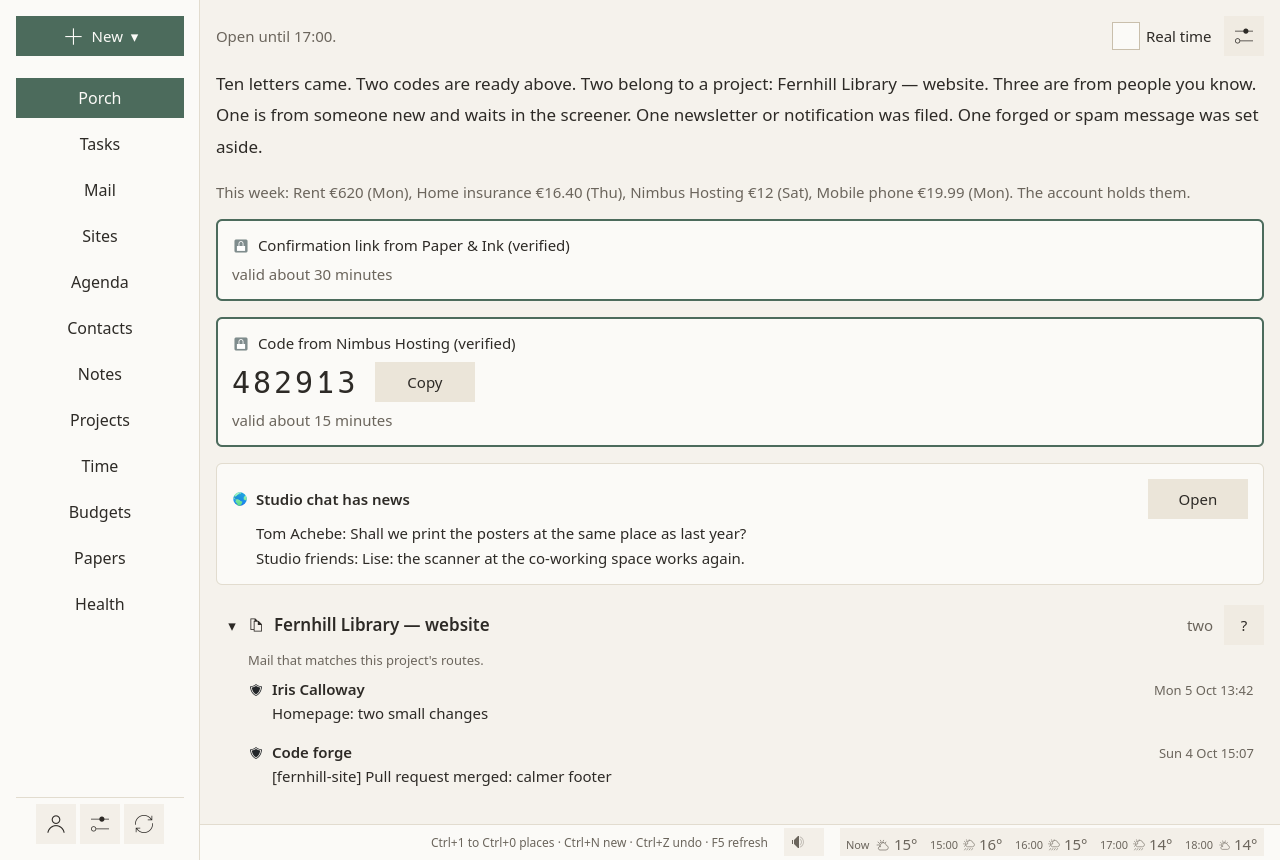
- In your hours, the Porch says until when it is open ("Open until 17:00."), then shows what came, sorted into lanes.
- Outside your hours, the Porch says when it opens next, and nothing else: no counts, no names. Open it anyway stays possible, quietly. Meanwhile, what comes is checked and sorted.
- Without any hours set, the Porch is always open.
Which mail comes in which hours follows what each address is for: work, your admin, leisure. Mail from the people you marked safe comes at any hour. See Hours.
Mail keeps arriving in the background all the while. The Porch only decides when it is shown.
Codes and links come at once
One-time codes, temporary passwords, password resets, sign-in links and links to confirm an address come from something you just asked a site for, and they expire. So Sioul shows them at once, whatever the hour, even when they come from a site's automatic address (no-reply…):
- one desktop notification, without sound, with the code, a button to copy it, and how long it stays valid;
- the same card on top of the Porch, with Copy.
Nothing else opens with it. Once it has expired, it is hidden, and the message goes to its lane. It expires when the message says, else when its kind usually does: a code after 30 minutes, a sign-in link after an hour, a password reset after two hours, a link to confirm an address after a day, a temporary password after a week.
Fake "your code" messages are a common phishing trick. A forged one is set aside. One from a sender that is only not verified still comes, with a warning: use it only if you just asked that site for it.
The lanes
Each message goes to the first lane that takes it, in this order:
| Lane | What it holds |
|---|---|
| Set aside | Forged mail, mail borrowing a name, spam, and senders you blocked. Shown at the bottom, each with the reason. Nothing is deleted. |
| Hostile, set aside | Only for an address you protect against harassment (below): insults, harassment, threats. Their words stay hidden. |
| Right now | Codes and links you just asked a site for, above. |
| One lane per project | Mail that matches the project's routes, or that belongs to a conversation of the project. See Projects. |
| Your public address | Mail to an address you protect, from someone you have not let in, read first and sorted by topic: work first. |
| Less important accounts | Mail of the addresses you ranked below the others: social networks, notifications you read now and then. Folded at the bottom. |
| Filed: newsletters and notifications | Mailing lists, newsletters and automatic senders (no-reply…). Folded. |
| Someone new, in the screener | A sender you do not know yet. You let them in, or not. |
| From people you know | Senders you let in. |
Mail you send yourself, from one of your addresses to another (a file sent from your phone), comes with the people you know, at any hour, never screened, when it is verified: a forged own address is a classic trick.
Under each lane's title, one line says what it holds. Its ? (How mail lands here) says, sentence by sentence, how mail lands there, and where to change it.
Letting someone in
A message in the screener has Let this address in: their next messages go to "From people you know".
Every message also has Their mail, in its menu (⋮), with three choices: Safe (their mail reaches you at any hour, quiet time included), Neutral (it waits for working hours), Blocked (set aside for good, never shown). The same lists, with patterns such as *@example.org, are in Accounts ▸ Senders.
Forged mail is judged apart: a forged message is set aside whatever the lists say, even if it claims to come from someone you marked safe.
Reading a message
A message opens on the right. Before its text:
- who sent it, and how far that is verified: verified, not verified, or forged. Hovering over the shield shows each check (SPF, DKIM, DMARC, ARC, reverse DNS), its result, and who made it;
- to whom, copied to whom, when, the subject;
- why it is here, folded until you ask.
Then the text, made safe:
- HTML mail keeps its paragraphs, lists, bold text and links. Nothing else is shown: no images, no styles, no scripts. Nothing loads from the network, nothing runs.
- Earlier messages that a reply quotes are folded under Show the earlier messages. A signature is dimmed.
- Every link shows its full address under the message while the pointer is on it, before you click.
- Attachments are folded, one line each with their kind, name and size. Opening or saving one runs the antivirus first; if the computer has none, Sioul says so and asks before opening. See Privacy and security.
From the message: reply, forward, archive, delete, and the rest, as on the Mail page.
Done for now
Done for now closes the Porch on what it showed. Anything newer waits for the next time it opens, even mail that reached the server earlier and arrived here later.
Closing the Porch tells nothing to the server: no message is marked read by it. Only opening a message marks it read, as in any mail program.
An address the Porch was never closed on shows its last two weeks only. Older mail stays in Mail, where it belongs.
Real time
The Real time box, at the top of the Porch, fetches every folder of every address each minute, and keeps the Porch open: for a code or a password you are waiting for. Untick it to go back to the usual pace.
In quiet time, Work now appears beside it, to show work whatever the hours. See Hours.
Above the lanes
When there is something, a few lines come before the lanes:
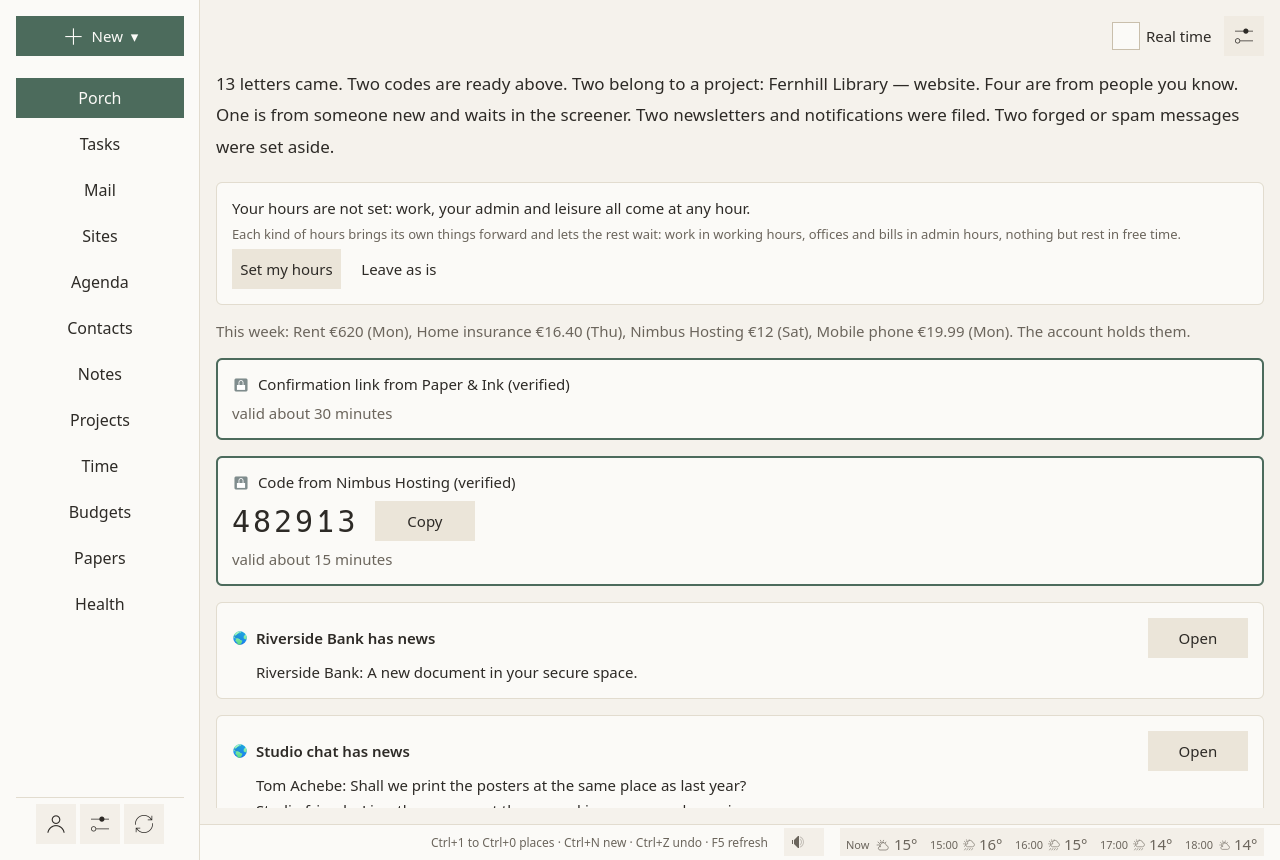
- When your hours are not set, a card asks for them, with Set my hours (which opens Settings at them) and Leave as is (which stops asking).
- "The site has news": what the websites you keep in Sioul notified, waiting for you. Opening the site clears its news. See Sites.
- Paper letters you scanned, each as a card: who, what, how much, by when. See Papers and letters.
- This week's payments, in one line: "This week: Electricity €62 (Mon). The account holds them." When something about money needs a look, it says so, without a count. See Budgets.
A public address, protected
An address you publish brings work, and sometimes insults. On its card in Accounts, Protected against harassment has its mail read before you see it:
- its tone: calm, rude, or hostile (insults aimed at you, harassment, threats), from word lists in French and English;
- its topic: work, a question, the press, thanks, a donation, something else.
Hostile mail goes to its own folded lane, which shows neither the sender's name nor the subject. Opening one asks first: it can wait, go to someone you trust (Forward to someone you trust), or go away (blocked, deleted). Reading it anyway is your choice, at a time that suits you. The rest of the address's mail has its own lane, work first, its topic shown, and a mark when it is rude.
Let the AI read it first, below it, is off unless you turn it on: then each new message to that address is sent once to Anthropic's Claude, with its subject, to say its tone and topic more finely than word lists can. The text leaves your computer for that. The key for Anthropic's service is typed once in Accounts and kept in your keyring.
The Porch's settings
The ⚙ at the top of the Porch holds what is the Porch's alone:
- Projects shown here: which projects have a lane on the Porch. The others' mail stays on their page in Projects.
- Paper letters ▸ Where scans arrive: the folder your scans come to.
- How mail is sorted: every lane, in the order mail is sorted, with its rules; the senders you know; the words that make a sender automatic (no-reply…).
What belongs to something else is set where that thing is: an address's rank and protection on its card in Accounts, a project's routes on its page in Projects, blocked senders in Accounts ▸ Senders, your hours in Settings.
Some addresses first, others last
On each address's card in Accounts, Priority: More important, Normal or Less important. Mail of the more important addresses comes first in every lane, with a small mark. Mail of the less important ones skips the screener and waits folded at the bottom. Their codes still come at once.
Why it works this way
- Checking mail three times a day lowered daily stress in a randomised trial (Kushlev & Dunn 2015). Batching notifications helped attention and mood, while having none at all made people more anxious (Fitz et al. 2019): what helps is predictability, not silence. So the Porch opens in hours you choose, and says when.
- Interrupted people work faster, with more stress and frustration (Mark, Gudith & Klocke 2008), and a notification left unanswered still costs attention (Stothart, Mitchum & Yehnert 2015). So nothing pops up, and nothing moves under your eyes when mail arrives.
- People avoid information they expect to hurt (Sweeny et al. 2010). So what a message is, who sent it and how far that is verified come before its text.
More in what the research says.